
Unipile MCP: Connect AI Agents to Multi-Channel Messaging
Learn how Unipile MCP bridges AI models with LinkedIn, WhatsApp, Telegram, and email. Setup guide, Docker config, tools, and multi-channel use cases.
Unipile MCP: Connect AI Agents to Multi-Channel Messaging
Getting AI models to send a LinkedIn message, check a WhatsApp thread, or pull Telegram DMs usually means stitching together separate APIs, auth flows, and data formats. Unipile MCP changes that. It wraps Unipile’s unified messaging API into a Model Context Protocol (MCP) server, so AI agents and tools like Claude Desktop can interact with messages across LinkedIn, WhatsApp, Telegram, Instagram, Messenger, and email through one standardized interface.
This guide covers what Unipile MCP is, how it works, how to set it up with Docker, the tools and resources it exposes, and practical patterns for multi-channel AI workflows. Whether you are building an AI copilot for sales, a candidate outreach agent, or a notification bot, you will leave with a working mental model and concrete configuration snippets.
What Is Unipile MCP?
Unipile MCP: Connect AI Agents to Multi-Channel Messaging - What Is Unipile MCP?.
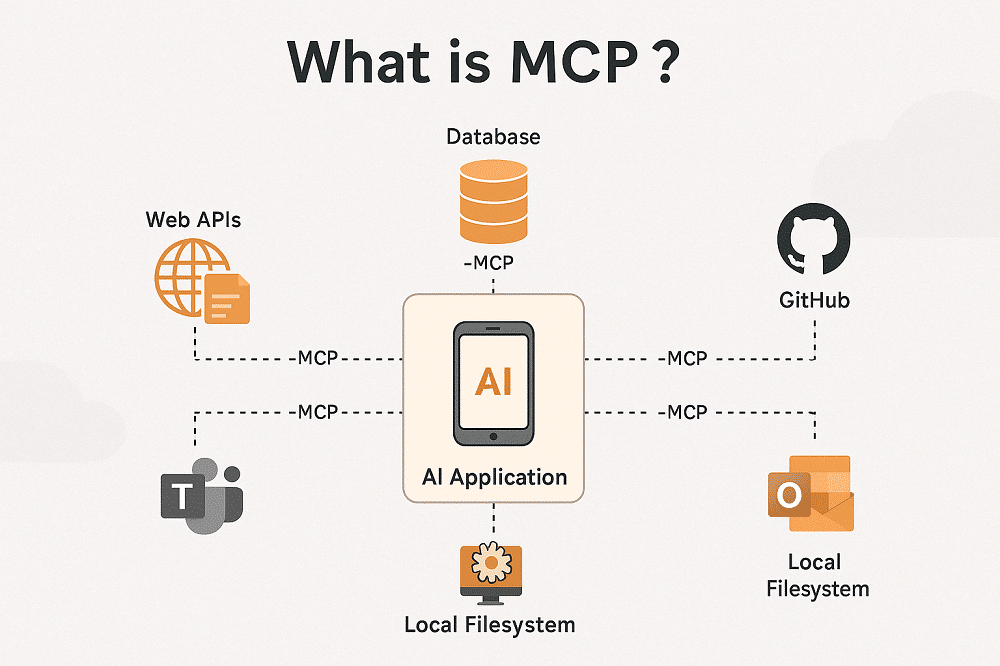
Unipile MCP is an open-source MCP server implementation that lets AI models read and act on messages from multiple communication platforms through Unipile’s API. Instead of teaching an AI agent how to authenticate against LinkedIn’s API, parse WhatsApp webhook payloads, and handle Telegram’s bot protocol separately, you point the MCP server at your Unipile account and let it normalize everything into a consistent set of tools and resources.
Under the hood, two layers work together:
- Unipile’s unified messaging API – Abstracts away provider-specific SDKs, authentication, rate limits, and event formats. It exposes a single REST API and standardized webhook events for channels like LinkedIn, WhatsApp, Telegram, Instagram, Messenger, X (Twitter), and email.
- The MCP server – Implements Anthropic’s Model Context Protocol so that compatible AI hosts (like Claude Desktop) can discover and call Unipile capabilities as native tools. The server translates MCP requests into Unipile API calls and returns structured results the model can reason over.
The result: an AI agent can ask “get the last 20 messages from this LinkedIn chat” or “list my recent WhatsApp conversations” without you writing channel-specific integration code.
Why Use an MCP Server for Multi-Channel Messaging?
Most messaging APIs were designed for application backends, not for AI models. They return deeply nested JSON, require OAuth flows that assume a browser, and enforce rate limits that make no sense for an agent that might poll for new messages every few minutes.
An MCP server addresses these friction points:
- Normalized tool signatures – The AI sees
unipile_get_chat_messagesinstead of five different REST endpoints with incompatible pagination. - Security isolation – API keys and DSNs stay on the server side. The AI host never touches raw credentials.
- Reduced integration surface – You onboard one MCP server, not six messaging APIs.
- Docker-native deployment – The community-maintained image runs on Linux/amd64, arm64, and arm/v7, making it easy to deploy alongside your AI host.
For teams already using Unipile to power multi-channel messaging in their SaaS, adding the MCP server turns the same infrastructure into an AI-accessible layer without duplicating accounts or auth.
How Unipile MCP Works
Unipile MCP: Connect AI Agents to Multi-Channel Messaging - How Unipile MCP Works.
Architecture Overview
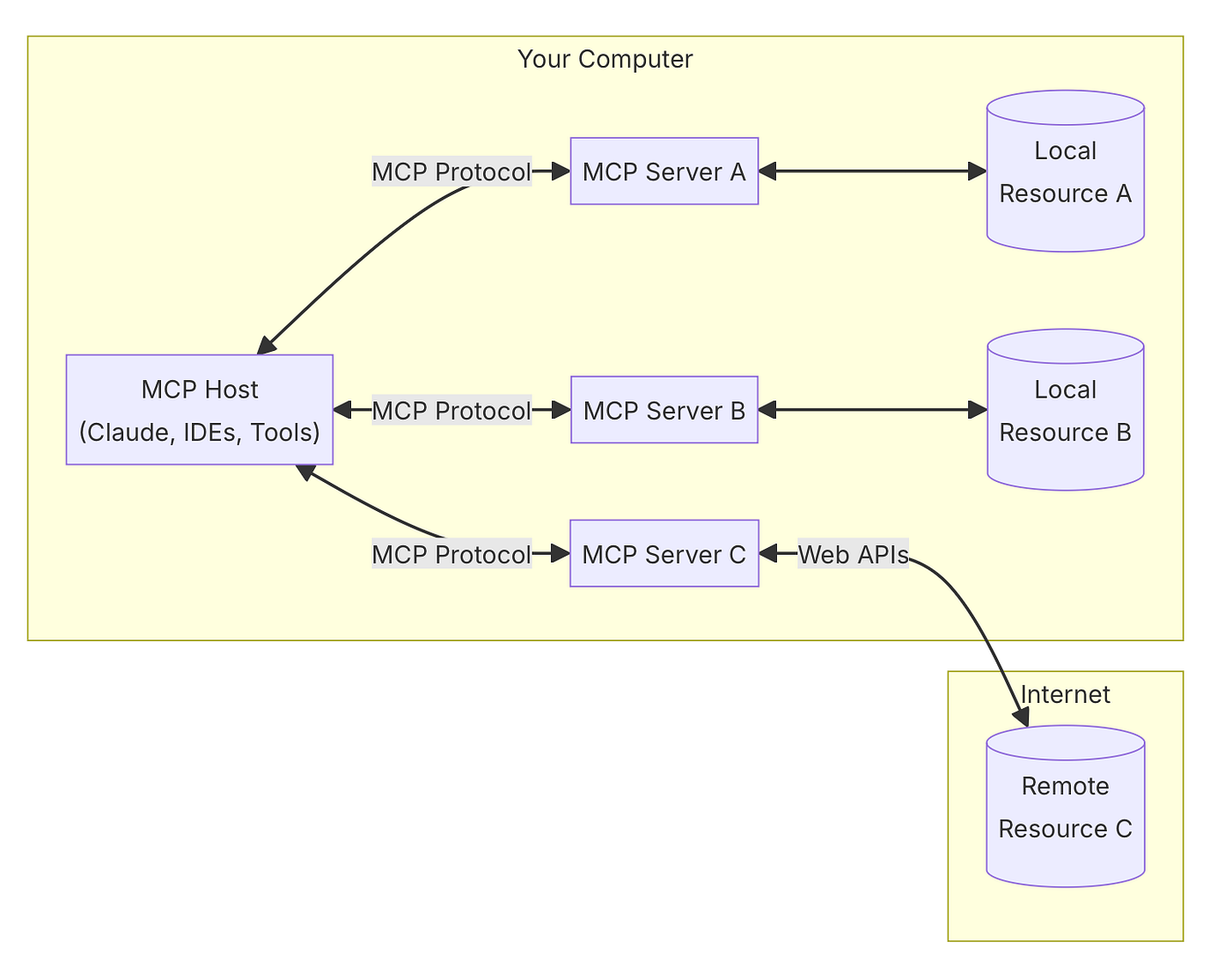
The MCP server sits between an AI host (Claude Desktop, a custom agent, or any MCP-compatible client) and your Unipile account. When the AI host invokes a tool, the server authenticates the request, calls the appropriate Unipile API endpoint, and returns normalized data.
AI Host (Claude Desktop)
        |
        | MCP protocol (stdio or HTTP)
        |
Unipile MCP Server (Docker container)
        |
        | REST + API key
        |
Unipile API (multi-channel messaging)
        |
        | Provider-specific protocols
        |
LinkedIn, WhatsApp, Telegram, Instagram, Messenger, Email
Resources and Tools
The server exposes one dynamic resource and several tools:
Resources
unipile://messages– A dynamic resource that provides access to messages from connected platforms. The AI can request this resource to pull message data into its context.
Tools
unipile_get_chat_messages– Retrieves all messages from a specific chat with pagination support. Acceptschat_id(required) andbatch_size(optional, default 100). Returns an array of message objects.
Additional tools can be extended based on the Unipile API surface, covering chat listing, message sending, and account management. The community server focuses on read operations, which is the most common AI-agent pattern for summarization, context gathering, and response drafting.
Example Prompt Flow
A user interacting with Claude Desktop might type:
“Get all messages from chat ID chat_123”
The AI host recognizes the intent, invokes unipile_get_chat_messages with chat_id: "chat_123", and the MCP server returns the message array. Claude can then summarize the thread, extract action items, or draft a reply—all without the user touching a messaging app.
Setting Up Unipile MCP
Unipile MCP: Connect AI Agents to Multi-Channel Messaging - Setting Up Unipile MCP.
Prerequisites
- A Unipile account – Sign up and obtain your DSN (e.g.,
api8.unipile.com:13851) and API key from the dashboard. A subscription is required; pricing starts with a free trial that includes all features. - Docker installed – The MCP server runs as a container. Docker Desktop or a server runtime works.
- An MCP-compatible host – Claude Desktop is the most common, but any host that speaks MCP over stdio can use the server.
Environment Variables
| Variable | Description |
|---|---|
UNIPILE_DSN |
Your Unipile DSN from the dashboard |
UNIPILE_API_KEY |
Your Unipile API key |
Keep your API key secure. Never commit it to version control or expose it in client-side code.
Docker Installation
Pull the community-maintained image from Docker Hub:
docker pull buryhuang/mcp-unipile:latest
Run the container:
docker run \
  -e UNIPILE_DSN=your_dsn_here \
  -e UNIPILE_API_KEY=your_api_key_here \
  buryhuang/mcp-unipile:latest
For multi-platform builds (amd64, arm64, arm/v7), use docker buildx:
docker buildx build --platform linux/amd64,linux/arm64,linux/arm/v7 \
  -t buryhuang/mcp-unipile:latest --push .
Connecting Claude Desktop
Add the server to your Claude Desktop configuration (claude_desktop_config.json):
{
  "mcpServers": {
    "unipile": {
      "command": "docker",
      "args": [
        "run",
        "-i",
        "--rm",
        "-e",
        "UNIPILE_DSN=your_dsn_here",
        "-e",
        "UNIPILE_API_KEY=your_api_key_here",
        "buryhuang/mcp-unipile:latest"
      ]
    }
  }
}
Restart Claude Desktop. The Unipile tools should appear in the available tool list. You can now ask Claude to fetch messages, summarize threads, or analyze conversations across your connected accounts.
Practical Use Cases
AI-Assisted Candidate Outreach
An ATS or recruitment platform can use Unipile MCP to let an AI agent read LinkedIn and WhatsApp conversations with candidates. The agent can summarize interview threads, flag unanswered messages, and draft follow-ups that recruiters review before sending. Because Unipile normalizes message formats, the agent works identically across channels. For a deeper look at automating candidate touchpoints, see this guide on recruitment messaging automation.
Sales Intelligence and CRM Sync
A CRM-integrated AI agent can pull recent LinkedIn and email exchanges with a lead, extract key objections and timeline signals, and prep a briefing for the next call. The MCP server handles token refresh and rate limits behind the scenes, so the agent never stalls on an expired OAuth token. This pattern fits naturally into CPaaS architectures where messaging, voice, and video APIs converge under a unified control plane.
Cross-Platform Notification Bots
Operations teams can build an internal bot that monitors Telegram alerts, WhatsApp support groups, and Instagram DMs from a single MCP-connected agent. The bot can triage messages by urgency, log them to a ticketing system, and escalate when certain keywords appear. The normalized message schema makes it straightforward to write triage logic once and apply it everywhere.
Secure Multi-Channel Delivery
For applications that handle sensitive data, Unipile MCP inherits Unipile’s security model: API key authentication, HMAC-SHA256 webhook signatures, and token-based provider auth. When combined with secure messaging standards, this gives AI agents a governed path to multi-channel delivery without exposing raw credentials to the model.
Unipile MCP vs. Direct API Integration
| Aspect | Unipile MCP | Direct Provider APIs |
|---|---|---|
| AI host compatibility | Native MCP tools and resources | Requires custom function-calling wrappers |
| Multi-channel normalization | Built-in via Unipile | Must build per channel |
| Auth management | Server-side token refresh | Manual OAuth per provider |
| Rate limit handling | Inherits Unipile’s retry and backoff | Must implement per provider |
| Deployment | Single Docker container | Multiple SDKs, webhook handlers |
| Best for | AI agents, Claude Desktop, copilots | Traditional app backends with full control |
Direct API integration makes sense when you need full control over every provider-specific feature. Unipile MCP shines when the goal is to give an AI model a clean, secure window into multi-channel conversations with minimal integration overhead.
Extending the MCP Server
The community server is open-source under the MIT license. You can extend it with additional tools that map to Unipile API endpoints:
- Chat listing – Expose a tool that lists all chats across connected accounts.
- Message sending – Add a tool that sends a message to a given chat ID, enabling AI-drafted replies.
- Account status – Surface connection health and provider status for monitoring.
Because the server is written in Python, adding a tool typically means defining a new function, wiring it into the MCP tool registry, and calling the corresponding Unipile REST endpoint. The Unipile API documentation provides the full endpoint reference.
Related reading
- How to Use Telegram: The Complete Beginner’s Guide - Learn how to use Telegram from setup to advanced features. This guide covers chats, groups, channels, secret chats, multi-device sync, and security settings.
Sources and further reading
- LinkedIn MCP API: Integration Guide for SaaS - Learn about the LinkedIn MCP API, its benefits, setup, and integration. Optimize LinkedIn messaging and outreach for your users.
- GitHub - honeybluesky/mcp-unipile - Contribute to honeybluesky/mcp-unipile development by creating an account on GitHub.
Frequently Asked Questions
What is the Model Context Protocol (MCP)?
MCP is an open standard from Anthropic that defines how AI models discover and interact with external tools and data sources. It replaces ad-hoc function-calling schemas with a consistent protocol for resources, tools, and prompts.
Do I need a paid Unipile subscription to use the MCP server?
Yes. The MCP server calls the Unipile API, which requires an active subscription. Unipile offers a free trial that includes all features, and paid plans start at €49/$55 per month for up to 10 connected accounts.
Which messaging platforms does Unipile MCP support?
The server can access any platform connected to your Unipile account: LinkedIn, WhatsApp, Telegram, Instagram, Messenger, X (Twitter), and email (Gmail, Outlook, IMAP). The exact tools available depend on the server implementation; the community server currently focuses on message retrieval.
Can I use Unipile MCP with AI hosts other than Claude Desktop?
Yes. Any MCP-compatible host can use the server. The protocol is transport-agnostic, though the current Docker setup uses stdio, which works with Claude Desktop and other local MCP clients.
Is the MCP server officially maintained by Unipile?
The current open-source server is community-maintained. Unipile provides the underlying API and official SDKs for Node.js, PHP, and Go. The MCP server wraps that API for AI host compatibility.
How do I handle multi-platform rate limits?
Unipile’s API includes built-in rate limiting, retries with idempotency, and failure isolation. The MCP server inherits these protections, so the AI agent does not need to track per-provider quotas.
Can I send messages through the MCP server?
The community server currently focuses on read operations. You can extend it with send capabilities by adding tools that call Unipile’s message-send endpoints. Check the server’s GitHub repository for contribution guidelines.
Conclusion
Unipile MCP turns a unified multi-channel messaging API into an AI-native interface. Instead of wiring each messaging platform into your agent separately, you deploy one Docker container, point it at your Unipile account, and let the AI discover conversations across LinkedIn, WhatsApp, Telegram, and email as structured tools.
For developers building AI copilots, sales agents, or notification bots, this combination removes the hardest parts of multi-channel messaging: auth management, format normalization, and rate limit coordination. The open-source server gives you a working starting point, and Unipile’s API provides the production-grade infrastructure underneath.
If you are already using Unipile for Telegram setup and multi-channel delivery or LINE integration, adding the MCP server is a natural next step toward AI-enabled workflows. Start with the Docker image, connect Claude Desktop, and see what your agent can do when it can read every conversation that matters.