
One REST API and a Native MCP Server for Messaging
How a single REST API plus a native MCP server lets AI agents and apps send WhatsApp, Telegram, LINE, TikTok, Zalo and X messages through one endpoint.
One REST API and a Native MCP Server for Messaging
Most messaging integrations fail for the same reason: every channel is its own island. WhatsApp has one auth flow, Telegram another, LINE a third, and each one ships a different payload shape, a different webhook signature scheme, and a different set of rate limits. When you add an AI agent on top, the problem compounds — the agent needs to discover what it can do at runtime, not read a PDF of endpoint docs.
A unified messaging API platform collapses that sprawl into one REST surface. Adding a native MCP server on top of the same surface is what makes those capabilities callable by an LLM. This article explains how the two layers fit together, where each one belongs, and how to design the boundary so you are not paying token costs for endpoints the model will never call.
Why one REST API is the right foundation
One REST API and a Native MCP Server for Messaging - Why one REST API is the right foundation.
A REST API is a contract between two pieces of software. Your code decides which endpoint to hit and when. That determinism is a feature: it is easy to cache, load-balance, log, and test.
For messaging, the value of a single contract is mostly about subtraction. Instead of maintaining six provider SDKs, six retry strategies, and six signature validators, you maintain one:
- One send path. A single
POST /v1/messagescall carries the channel, recipient, and content. Provider-specific quirks stay behind the boundary. - One inbound shape. Status updates, inbound messages, and account events arrive as normalized JSON rather than six different envelopes.
- One delivery model. Rate limits, retries, idempotency keys, and failure isolation live in the platform rather than in every service that sends a message.
- One security story. Workspace API keys and HMAC-SHA256 signatures apply uniformly, so you are not auditing six auth schemes.
UnifyPort is built around exactly this model: WhatsApp, Telegram, LINE, TikTok, Zalo, and X through one REST API and one standard webhook event stream, with official SDKs for Node.js, PHP, Go, and Python. The platform organizes resources around workspaces, messaging accounts, and connection runtime states, and the account lifecycle covers QR code, verification code, password, Passkey, and session import flows. If you have ever debugged a pairing flow that stalls on a WebAuthn challenge, you already know why a documented lifecycle matters — see passkey_required WhatsApp QR: Fix Stuck Pairing for that specific failure mode.
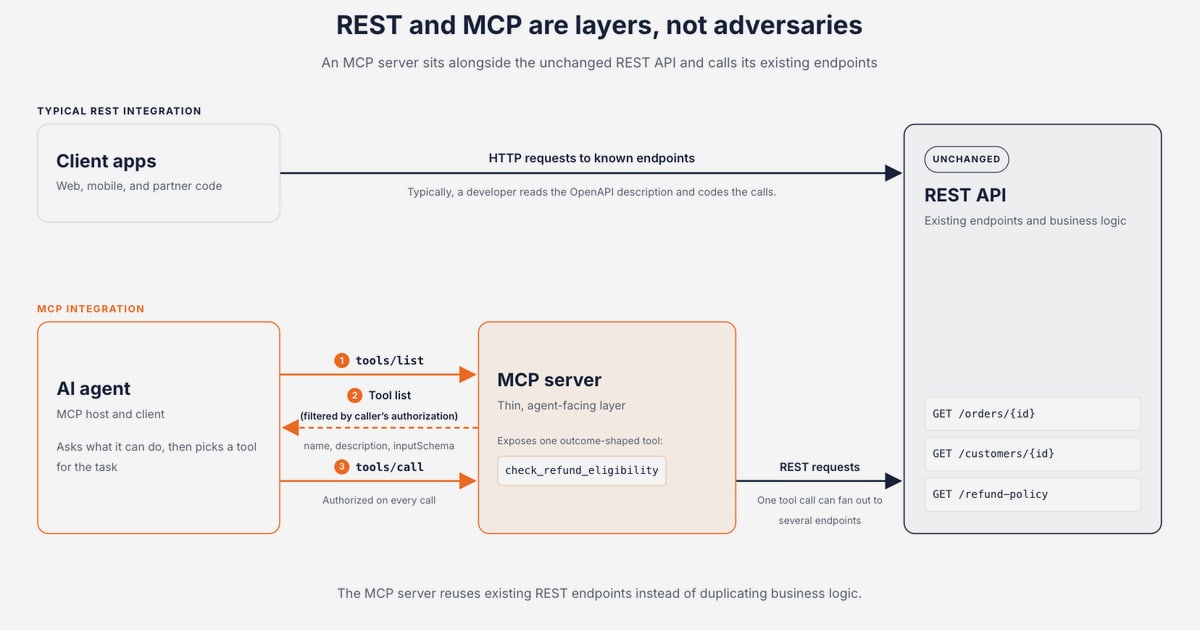
REST is the layer your application code talks to. It is not, by itself, the layer an LLM can reason over.
What a native MCP server adds
One REST API and a Native MCP Server for Messaging - What a native MCP server adds.
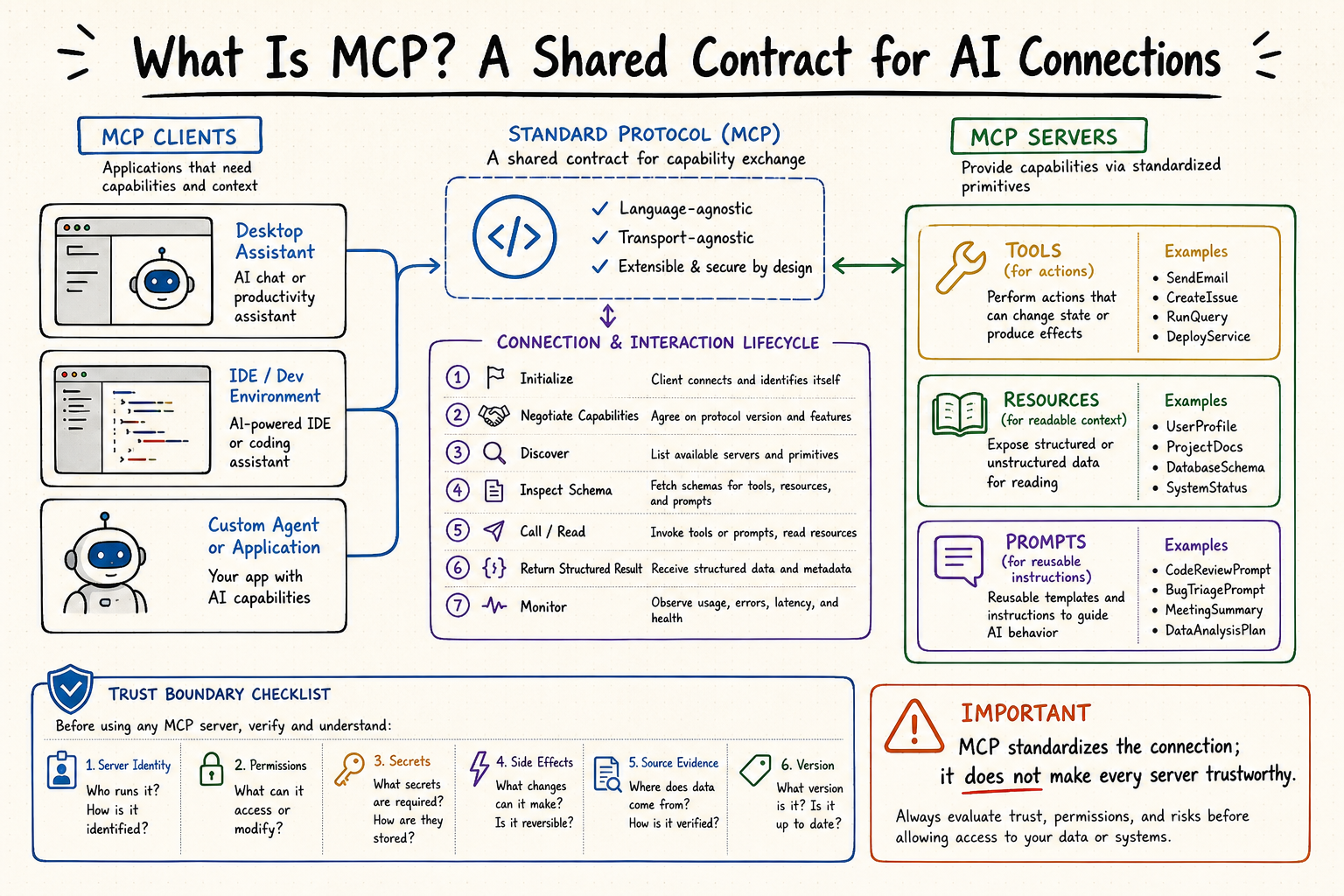
The Model Context Protocol is an open, JSON-RPC-based standard that lets AI applications discover tools, resources, and prompts from external servers and invoke them over HTTP. It was published by Anthropic in late 2024 and has since become the common way agents find and call capabilities.
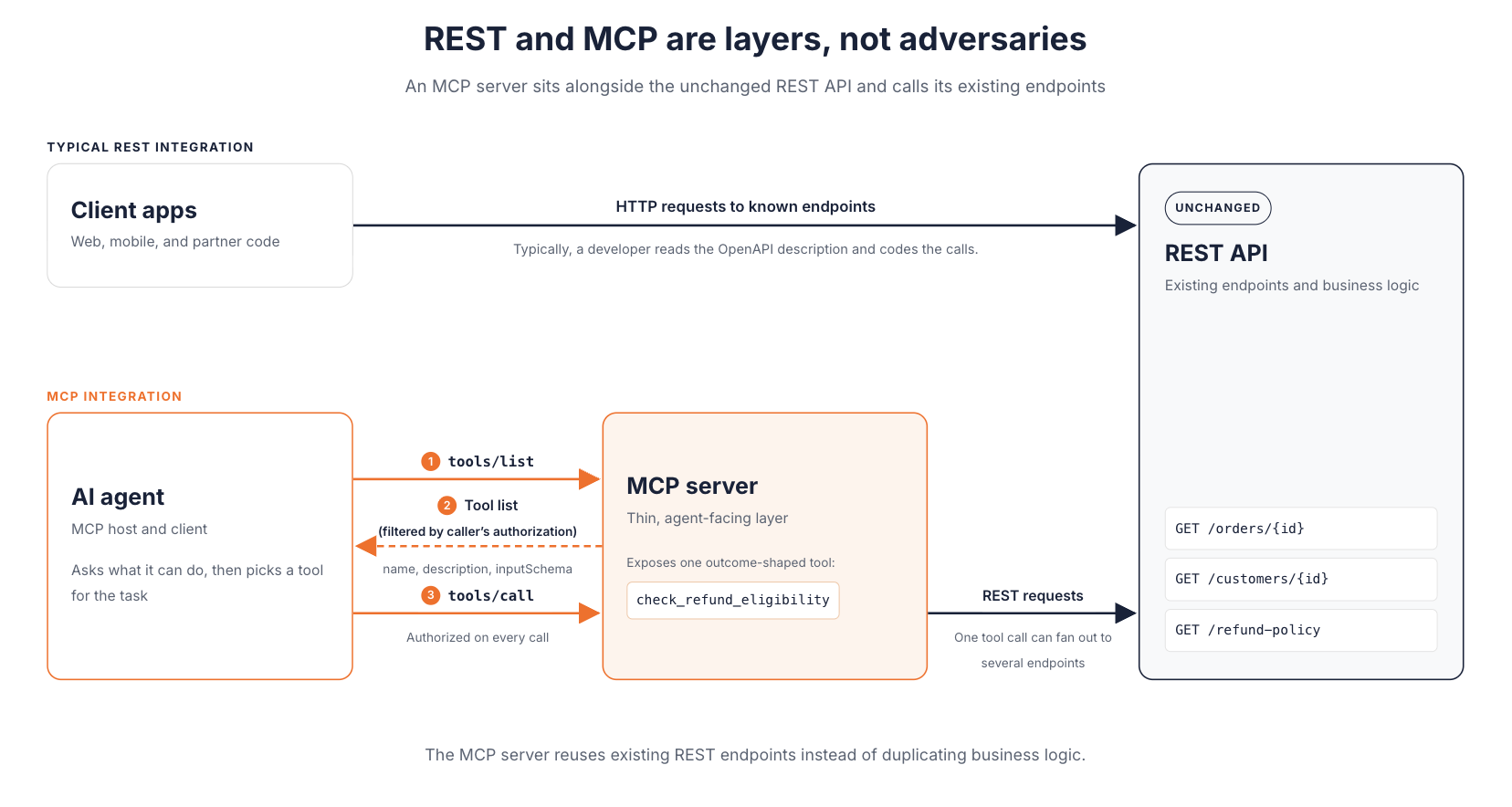
The important framing: MCP does not replace the REST API. It sits above it. Your REST operations still do the work — authenticating, sending, persisting state. MCP provides the AI-native discovery and tool semantics on top.
Three mechanical differences matter in practice:
- Discovery. A REST API does not describe itself at runtime. An MCP server is queryable: ask what tools exist and you get back a machine-readable list with input schemas and descriptions. Add a tool and clients can use it without a code change.
- Invocation model. REST maps HTTP methods to resources. MCP exposes tools (executable functions), resources (context data), and prompts (reusable templates). Not everything belongs as a callable tool.
- Who is in control. With REST, your application decides the call sequence. With MCP, the model decides which tool to invoke based on the user's request. That shift is the whole point — and also the source of new risk.
There is a useful comparison of how these layers differ and where each one earns its place in MCP vs API: What's the Difference and When to Use Each?. The short version: APIs are for applications, MCP is for models, and most real systems run both.
The stateless shift
One thing that changed recently: the MCP 2026-07-28 specification revision retired sessions and the initialize handshake, made list results cacheable, and moved routing into HTTP headers. MCP is now a request/response protocol where every call is self-describing and any request can land on any server instance behind a round-robin load balancer. The architectural gap between MCP and REST narrowed considerably. MCP vs. REST: What's the right way to connect AI agents to your API? walks through what still separates them and what no longer does.
What remains is the part that actually matters for agents: runtime discovery, tool semantics, and a standardized interface that collapses the M×N connector problem into M+N.
How the two layers fit together in a messaging stack
One REST API and a Native MCP Server for Messaging - How the two layers fit together in a messaging stack.
Picture the request path for an agent that handles customer conversations across channels.
Layer 1 — the REST contract. Your backend, or a deterministic workflow, calls POST /v1/messages with a channel and recipient. The platform handles provider auth, rate limits, retries, and idempotency. Inbound events arrive on one webhook stream, normalized into a stable JSON shape, with signature verification and retry behavior managed by a webhook control plane.
Layer 2 — the MCP surface. An agent needs to answer "did the customer reply on LINE, and should I escalate?" It discovers a small set of tools — something like send_message, list_conversations, get_message_status — and decides the order itself. Each tool call transits to the REST layer underneath.
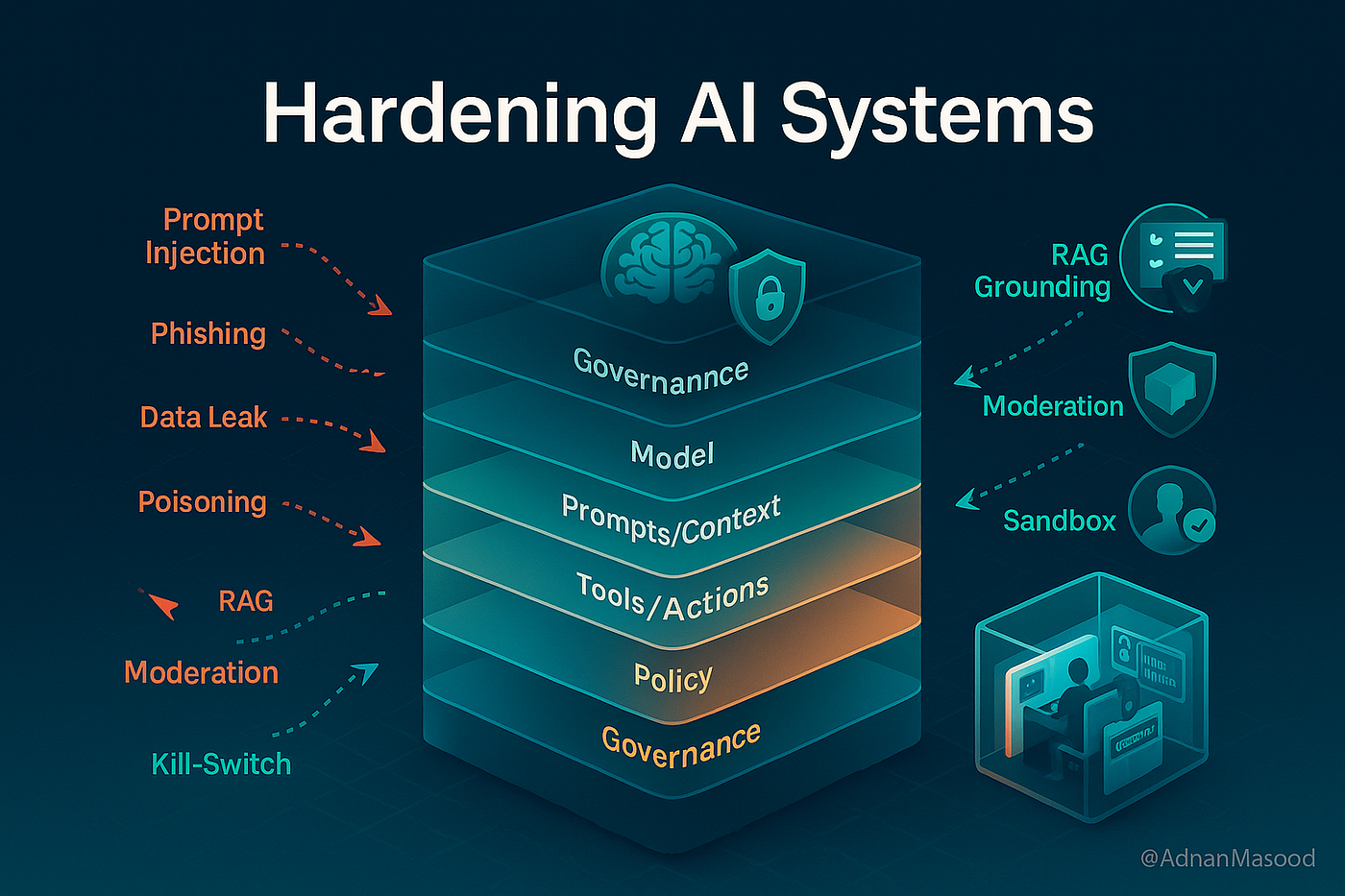
Layer 3 — your policy path. Authentication, quotas, and logging should apply identically whether a request came from your code or from an agent. If MCP traffic bypasses your existing controls, you have built a second, unaudited system.
Google Cloud's approach to this is instructive. As described in Turn your REST APIs into MCP tools with Google Cloud API Gateway, annotating an existing OpenAPI 3.x spec lets the gateway serve MCP on a /mcp base path, transcoding JSON-RPC tools/call requests into the corresponding REST calls. Because the transcoded request is indistinguishable from a normal REST call, existing JWT or API-key authentication, quotas, and logging keep working unchanged. That is the pattern to aim for: one policy path, two entry points.
A practical tool design rule
The most common mistake is wrapping every REST endpoint one-to-one as an MCP tool. It feels efficient. It is not.
Every tool definition and every response spends tokens from the model's context budget. Return fifty fields when the model needs three and you are burning money and degrading reasoning quality. Design MCP tools for what the model actually needs to decide, not as a thin mirror of your API surface.
For a messaging platform, that usually means a handful of tools:
- Send a message to a channel and recipient
- Read recent messages in a conversation
- Check delivery status for a specific message
- List active messaging accounts and their connection state
Everything else — bulk exports, account provisioning, signature rotation — belongs in the REST layer where deterministic code calls it.
When to use REST, MCP, or both
One REST API and a Native MCP Server for Messaging - When to use REST, MCP, or both.
| Situation | Right layer |
|---|---|
| Backend service sends a notification on a known schedule | REST |
| Webhook consumer writes inbound messages to a database | REST + webhook stream |
| Agent decides which channel to reply on based on conversation context | MCP |
| Agent needs to look up delivery status mid-task | MCP |
| Admin tool provisions a new messaging account | REST |
| Agent orchestrates send, wait, and escalate across several steps | MCP over REST |
A plain API is the right choice when a developer is writing code against a known service with fixed calling logic. MCP adds nothing there. MCP is the right choice when the sequence of actions is not known until the user asks.
Most real AI feature work needs both. Your REST API handles operations; MCP makes a curated subset of them accessible to the model.
Permissions are the part people skip
Letting a model choose its own call path introduces risk a fixed integration does not have. Without explicit boundaries, an agent can send a message to the wrong recipient or trigger an operation it was never meant to touch.
APIs handle this with auth keys and rate limits. MCP addresses it through defined capabilities, scopes, and authentication methods in the spec. Do not assume defaults keep you safe. Decide deliberately which tools an agent may call, scope credentials to the minimum needed, and keep destructive operations out of the tool list entirely.
Tracing gets harder, not easier
When something breaks in an MCP-driven workflow, reproducing it is harder than a standard API failure. The call path was chosen at runtime by the model. To understand what went wrong you need to see what the model saw, which tool it called, and what the downstream REST call returned — ideally in a single trace rather than stitched together from separate logs.
If your messaging platform already normalizes every provider event into one JSON shape, you are ahead. One event schema means one trace format, which means agent failures are debuggable rather than archaeological.
Where UnifyPort fits
UnifyPort is a unified messaging API platform, and its architecture maps cleanly onto the two-layer model above.
- The REST layer is
POST /v1/messagesplus a standard webhook event stream, with official SDKs for Node.js, PHP, Go, and Python. - The event layer converts every provider message, status update, and account event into one stable JSON shape, so downstream consumers do not branch on channel.
- The webhook control plane manages signatures, subscriptions, retry behavior, and failure tracking.
- The delivery queue handles rate limits, retries, idempotency, and failure isolation.
- Security runs on workspace API keys and HMAC-SHA256 signatures with minimal exposure patterns.
For teams building multi-channel messaging features, customer engagement tools, or notification systems, the practical benefit is not having to rebuild integrations per platform. Pricing is based on messaging-account costs in USD with transparent graduated pricing, unified API access, and free messaging accounts in every workspace.
If you are evaluating this space more broadly, UnifyPort vs SocialAPI.ai vs Unipile: 2026 API Comparison compares channels, webhook behavior, MCP support, pricing, and developer fit. For teams already running a support stack, How to Use UnifyPort with Zendesk: Unified Messaging Setup shows how conversations become routed tickets, and How to Use UnifyPort with Svix: Unified Messaging Webhooks covers fanning events out to customer endpoints reliably.
Related reading
- Top 10 Omnichannel CPaaS Products 2026: Ranked Review - Ranked 2026 review of the top 10 omnichannel CPaaS products, with transparent criteria, evidence, channel coverage, developer fit, and buying guidance.
- UnifyPort vs MSG91: Unified Messaging API or CPaaS Suite? - UnifyPort vs MSG91 compared: unified messaging API for WhatsApp, Telegram, LINE, TikTok, Zalo and X versus MSG91's SMS, OTP and CPaaS suite.
FAQ
Is a native MCP server a replacement for a REST API?
No. MCP sits above your REST API. The REST layer still performs the actual work — authentication, sending, persistence, rate limiting. MCP provides runtime discovery and tool semantics so a model can decide which operations to invoke.
Do I need MCP if my messaging integration is fully automated?
Usually not. If your code already knows which endpoint to call and when, REST is simpler and cheaper. MCP earns its place when the call sequence is not known until runtime, or when an agent needs to orchestrate several steps across services.
How many MCP tools should a messaging platform expose?
Fewer than you think. Each tool definition and response consumes the model's context budget. A small set covering send, read, status, and account state is usually enough. Keep provisioning, bulk operations, and administrative actions in the REST layer.
Does MCP still use sessions?
The MCP 2026-07-28 specification revision retired sessions and the initialize handshake. MCP is now a request/response protocol where calls are self-describing and can land on any server instance behind a load balancer.
How should agent traffic be authenticated?
Ideally through the same policy path as your REST traffic. If your gateway or platform already enforces API keys, quotas, and logging, MCP calls should flow through those controls rather than around them. For messaging specifically, workspace API keys and HMAC-SHA256 signatures should apply to agent-originated sends the same way they apply to application-originated ones.
What breaks first when you add agents to a messaging stack?
Observability. A runtime-chosen call path produces failures that look nothing like a standard API error. Normalized event schemas and unified tracing help, but plan for it before you ship, not after.
Conclusion
One REST API gives you a single contract for six messaging channels. A native MCP server on top of that contract gives an AI agent a discoverable, standardized way to use it. The two layers are complementary, not competing: REST does the work, MCP makes a curated subset of that work legible to a model.
The design decisions that matter are unglamorous. Keep the MCP tool surface small. Route agent traffic through the same authentication, quota, and logging path as everything else. Keep destructive operations out of the tool list. And make sure every provider event lands in one JSON shape, because that is what makes agent failures traceable instead of mysterious.
Get those right and adding a new channel stops being an integration project. It becomes a configuration change.