
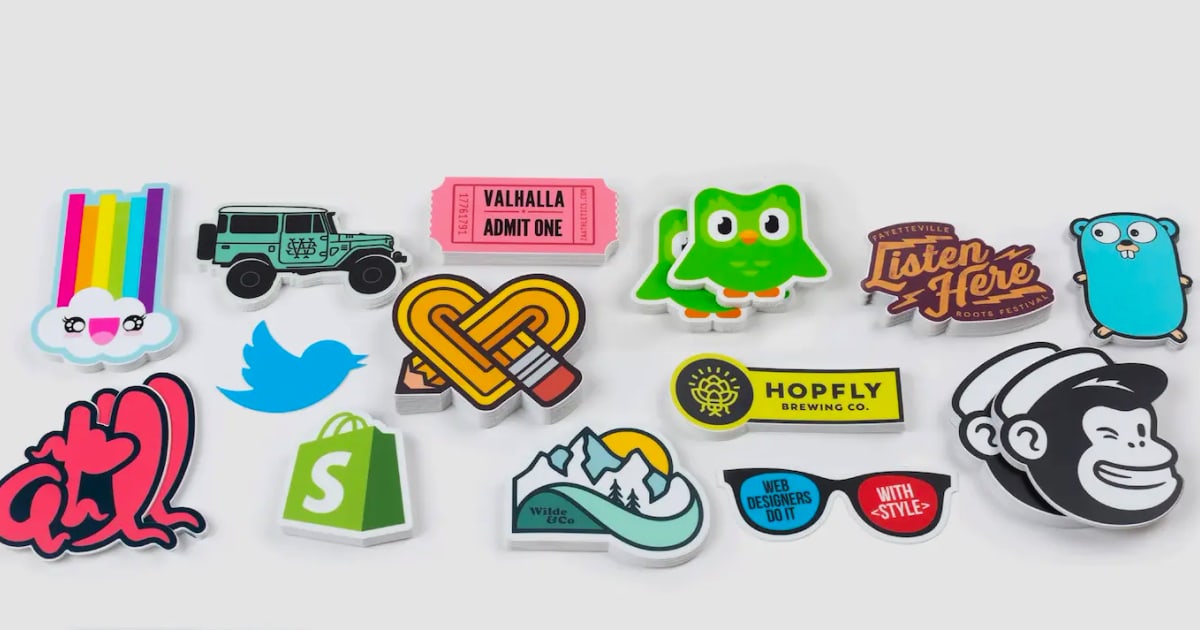
Stickers Guide: Custom Printing, Vinyl & Digital Messaging Stickers
Learn about physical sticker types, custom sticker printing, design tips, and digital stickers for messaging apps. Discover how UnifyPort unifies sticker messages across LINE, WhatsApp, Telegram & more.
Stickers Guide: Custom Printing, Vinyl & Digital Messaging Stickers
Stickers have evolved far beyond the playful decals of childhood. Today they are everywhere—personalizing laptops, branding products, and even embedding themselves into our daily text conversations on messaging apps. Whether you want to print custom vinyl stickers for your small business or send a branded sticker pack to customers on LINE, understanding the full spectrum of sticker possibilities can unlock creative and commercial potential.
This guide covers everything from physical sticker types and custom printing to the rise of digital stickers in messaging. We’ll also explore how developers can use a unified API to send sticker messages across multiple platforms with a single integration.
Types of Physical Stickers
Not all stickers are created equal. Choosing the right material and cut makes a dramatic difference in appearance, durability, and intended use.
- Vinyl stickers: Weather-resistant, durable, and perfect for outdoor use or items that get wet, like water bottles and car bumpers. Vinyl comes in glossy or matte finishes.
- Paper stickers: Cost-effective and great for indoor applications—planners, scrapbooks, envelopes, and packaging. They are not water-resistant.
- Holographic stickers: A vinyl variant with a rainbow, shimmering effect that catches the light and adds a premium look.
- Clear stickers: Transparent vinyl that lets the surface color show through, ideal for windows or glass.
- Kiss-cut stickers: Precision cut through the vinyl layer only, leaving the backing intact so you can peel individual shapes easily.
- Die-cut stickers: Cut completely through both the vinyl and backing, producing a standalone shape with no excess material.
When ordering from custom print shops, you'll often have the choice between these materials and cuts.
How to Order Custom Stickers
Creating your own stickers is simpler than ever. Follow these steps to bring your design to life:
- Prepare your artwork: Use a high-resolution file (at least 300 DPI) with a transparent background if you want a contour cut. Vector files (SVG, AI) yield the cleanest results.
- Choose your material and size: Decide between vinyl, paper, or holographic, and pick from standard sizes or a custom dimension.
- Select the cut style: Kiss-cut for sheets or die-cut for individual stickers.
- Upload and place your order: Use a reputable sticker printing service that offers online proofs.
- Review the proof: Check trim lines and color accuracy before production.
Many platforms allow you to upload artwork and see an instant preview. Shipping is often free above a certain order value, and turnaround times can be as fast as 2–3 business days with rush options.
Best Sticker Marketplaces and Printing Services
Whether you’re shopping for unique artist designs or need bulk custom printing, these platforms are excellent starting points:
- Redbubble: A massive marketplace of independent artists offering kiss-cut vinyl and holographic stickers. White, transparent, and holographic variants available in four sizes. Frequent discounts on multiples.
- CustomStickers.com: Specializes in custom printed stickers with free shipping and fast turnaround. User-friendly design tool and professional-grade materials.
- Pipsticks: Curated cute and unique vinyl stickers for planners, laptops, and scrapbooking, often subscription-based.
Each service caters to a slightly different need: ready-made art, quick custom orders, or niche design collections.
Sticker Design Tips for a Professional Look
Even a simple design can stand out with a few professional techniques:
- Use bold, simple shapes—intricate details can get lost at small sizes.
- Add a white border (bleed) around your design to make it pop on any colored surface.
- Choose colors that contrast well with common backgrounds like silver laptops or clear glass.
- If you’re designing for die-cut stickers, ensure your edge path is smooth to avoid jagged cuts.
- For holographic stickers, use semi-transparent areas to let the shimmer show through vividly.
Digital Stickers: The Rise of Stickers in Messaging Apps
First viewport screenshot of Account lifecycle — API Reference — UnifyPort.
While physical stickers decorate objects, digital stickers enhance conversations. Platforms like LINE, WhatsApp, and Telegram have perfected the sticker as a communication tool—allowing users to express emotions, create branded content, and even complete transactions through sticker packs.
LINE stickers are particularly famous, with entire economies built around artist sticker sets. Brands use LINE stickers for campaigns, turning customers into brand ambassadors. Telegram offers an open sticker platform where anyone can upload sticker packs. WhatsApp supports sticker messages through its Business API, enabling companies to send pre-approved sticker content.
For businesses, digital stickers represent an opportunity for engagement that goes beyond text. A welcome sticker, a promotional character, or a celebratory emoji pack can strengthen customer relationships instantly.
Sending Stickers at Scale with Unified Messaging APIs
First viewport screenshot of UnifyPort — One Port, Every Channel..
If your application sends sticker messages across multiple channels, managing separate integrations for each platform’s sticker format becomes complex. LINE uses its own sticker formats and package IDs, Telegram has its unique sticker file references, and WhatsApp requires specific media message structures. A unified messaging API solves this by normalizing sticker delivery.
UnifyPort is a unified messaging API platform that lets developers send sticker messages to LINE, WhatsApp, Telegram, X (Twitter), Zalo, and TikTok through a single REST endpoint. Instead of learning each provider’s SDK and sticker constraints, you send a standardized sticker payload, and UnifyPort handles the conversion, rate limiting, and delivery.
For example, to send a LINE sticker, you would post:
{
  "channel": "line",
  "account": "my-line-account",
  "to": "user123",
  "message": {
    "type": "sticker",
    "sticker": {
      "package_id": "1",
      "sticker_id": "2"
    }
  }
}
The same endpoint works for sending a Telegram sticker by switching the channel field and providing a file identifier. UnifyPort’s standard event layer then returns a consistent webhook event once the sticker is delivered, no matter the underlying platform. This is particularly useful for AI agents, notification systems, or marketing automation tools that need to react to message statuses uniformly.
For a broader comparison of multi-channel messaging APIs—including sticker support, channel coverage, and pricing—see the Top 10 Multi-Channel Messaging APIs in 2026.
Use Cases for Digital Stickers in Business
First viewport screenshot of API Reference — UnifyPort.
- Brand engagement campaigns: Launch a free sticker pack on LINE after a user shares your post, tracked via the unified API.
- Customer support: Greet users with a friendly sticker and route them to an agent, all through the same messaging pipeline.
- Transactional notifications: Accompany a purchase confirmation on WhatsApp with a branded “thank you” sticker for a personal touch.
- Multi-channel promotions: Deploy the same sticker design across Telegram, LINE, and WhatsApp simultaneously without rewriting code.
LINE’s rich sticker ecosystem is a natural fit for these tactics. Learn more about LINE features and how stickers work inside the app on our LINE Messaging App guide.
Sticker FAQ
First viewport screenshot of Messaging Account Pricing & API Access — UnifyPort.
What’s the difference between vinyl and paper stickers?
Vinyl stickers are waterproof and durable, making them suitable for outdoor use and items that get wet. Paper stickers are more affordable but will tear and fade when exposed to moisture.
Can I create custom stickers without any design skills?
Yes. Many printing services offer free templates and design tools with drag-and-drop elements. You can also hire a freelance designer for a professional look.
How do I send stickers on WhatsApp Business?
WhatsApp supports sticker messages via its Business API. You need to upload sticker images as WebP files that meet WhatsApp’s guidelines, then reference them in your API calls. A unified messaging platform like UnifyPort can simplify this by providing a single sticker sending method across all channels.
Do digital stickers work the same on LINE and Telegram?
Not exactly. LINE uses packages and sticker IDs, while Telegram uses uploaded sticker sets and file identifiers. A multi-channel API normalizes these differences, so you send a sticker intent and the platform translates it for each provider.
What size should I order for custom stickers?
Common sizes range from 2×2 inches for logos to 3×4 inches for bumper stickers. Always check the surface area you intend to decorate and order a sample if possible.
Related reading
- CM.com Stock (CMCOM.AS): Price, Ticker & Investment Guide - CM.com (CMCOM.AS): stock price, analyst targets, shareholder structure, and how to invest in this Euronext conversational commerce company.
- What Is CM.com? The AI-Powered Customer Conversation Platform - Discover CM.com's AI-driven platform for customer conversations—messaging, marketing, service, and payments sharing one context. Learn how it works and compare with multi-channel APIs like UnifyPort.
- How to Log Into Telegram on Any Device: Step-by-Step Guide - Learn how to log into Telegram on mobile, desktop, and web. Fix SMS code problems, reset two-step verification, and recover banned accounts. Developer API login with UnifyPort.
Sources and further reading
- Custom Stickers | Fast & Free Shipping – CustomStickers.com - Custom Stickers | Fast & Free Shipping – CustomStickers.comCustomStickers.comhttps://customstickers.comCustomStickers.comhttps://customstickers.comAt CustomStickers we make it easy to create premium custom printed stickers. stickers, free shipping, and fast turnaround.4.8 store rating (612) · Free d
- Cute Vinyl Stickers - Cool, Fun & Awesome - Cute Vinyl Stickers - Cool, Fun & AwesomePipstickshttps://www.pipsticks.com › All CollectionsPipstickshttps://www.pipsticks.com › All CollectionsOur cute vinyl stickers are cool and unique. Decorate laptops, calendars, planners, scrapbooks, and more. We've got all your favorite designs!4.1 store rat
Conclusion
Stickers bridge the physical and digital worlds. High-quality custom vinyl decals can build brand visibility IRL, while digital sticker packs on messaging apps create emotional connections with audiences. By understanding the printing process, material options, and the power of sticker APIs, you can execute a cohesive sticker strategy that lives on laptops, water bottles, and inside chat conversations. Whether you’re selling artist-designed stickers or building a multi-channel notification bot, the sticker medium remains one of the most universal and engaging forms of modern expression.