

Instant Messaging: How It Works, Top Apps, and API Strategy
Learn what instant messaging is, how it works, key features, top consumer and business apps, and how developers can connect IM channels via a unified API.
Instant Messaging: How It Works, Top Apps, and API Strategy
Instant messaging (IM) is real-time text-based communication between two or more people over the internet. What began as simple buddy-list chat on desktop computers has grown into a global communication layer that carries text, images, voice notes, files, video calls, and even payments. Today, IM apps are the most widely used smartphone applications on the planet, with billions of monthly active users across WhatsApp, Telegram, LINE, and others.
This guide explains what instant messaging is, how the technology works, which apps matter in 2025, and how developers and businesses can connect to multiple messaging channels without building separate integrations for each one.
What Is Instant Messaging?

Instant Messaging: How It Works, Top Apps, and API Strategy - What Is Instant Messaging?.
Instant messaging is a form of synchronous, computer-mediated communication that delivers messages between users in real time. Unlike email, where replies can take hours or days, IM conversations happen in a continuous flow, with read receipts, typing indicators, and presence status making the exchange feel immediate.
The term originally distinguished internet-based chat from SMS text messaging, which ran over cellular networks and charged per message. IM ran over computer networks, allowed longer messages, and was effectively free beyond the cost of internet access. That distinction has blurred as mobile messaging apps absorbed both functions, but the core idea remains: instant messaging is internet-delivered, real-time conversation.
Modern IM platforms go far beyond text. Most support:
- Multimedia sharing: images, video, audio clips, and documents
- Voice and video calling: one-to-one and conference calls
- Group chat: private groups, public channels, and community spaces
- Presence indicators: online status, last seen, and read receipts
- Emoji, stickers, and reactions: lightweight emotional expression
- Payments: peer-to-peer transfers in apps like WeChat and Facebook Messenger
How Instant Messaging Works
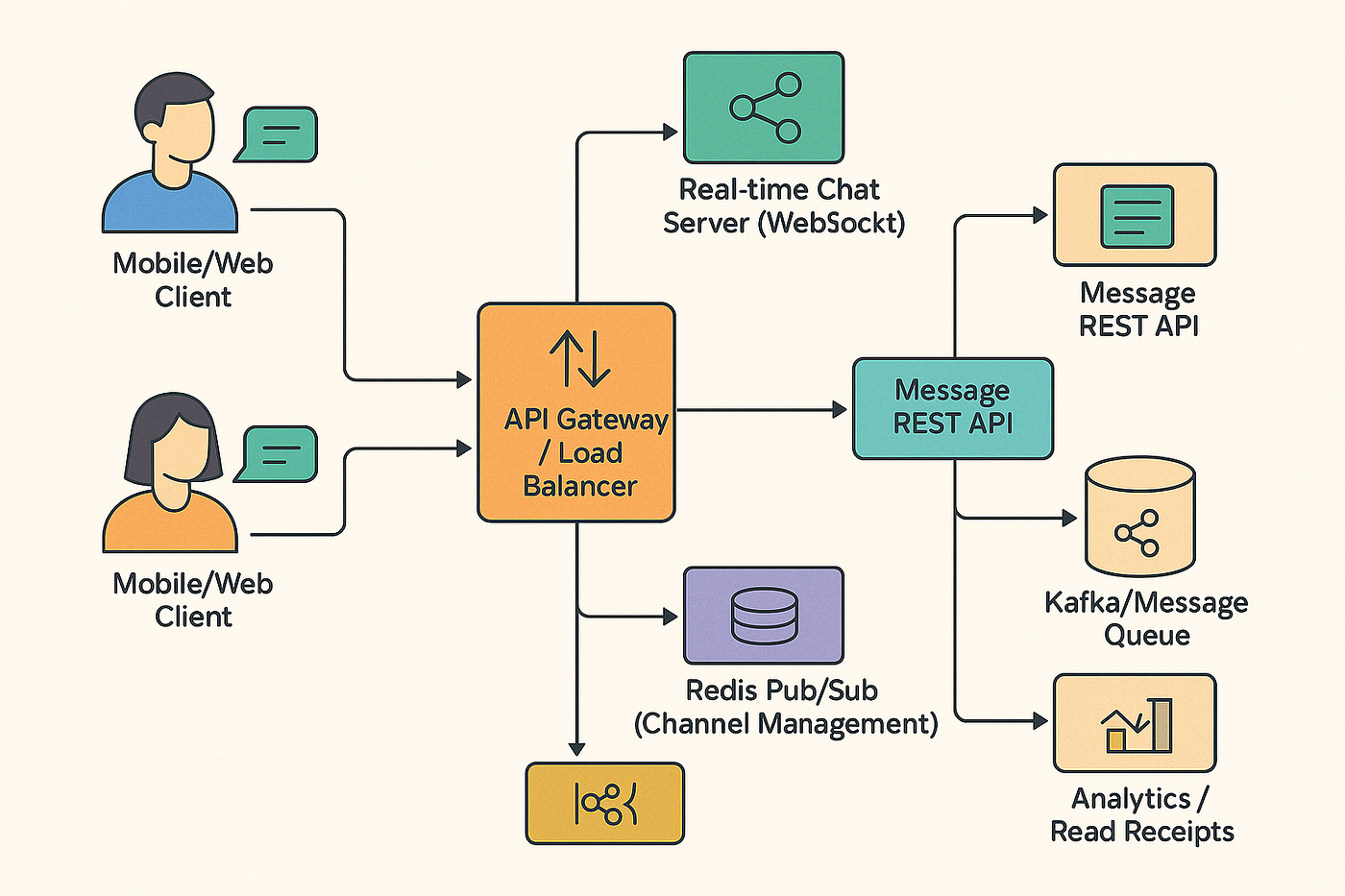
Instant Messaging: How It Works, Top Apps, and API Strategy - How Instant Messaging Works.
Most instant messaging systems follow a client-server architecture. When you send a message, your client transmits it to the platform's central server, which routes it to the recipient's device. This differs from peer-to-peer protocols like older XMPP implementations, where clients could connect directly.
The client-server model is why most IM networks are closed ecosystems: a WhatsApp user cannot natively message a Telegram user. Each platform operates its own servers, protocols, and identity systems. Some third-party clients historically bridged multiple networks, but modern platforms have largely locked down their APIs to control the experience and security.
From a user's perspective, the flow is simple:
- Sign in to your preferred platform
- Select a contact or group from your list
- Type a message and press send
- The recipient receives a notification and replies in real time
Behind the scenes, the platform handles message queuing, delivery confirmation, offline storage, and synchronization across devices.
A Brief History of Instant Messaging

Instant Messaging: How It Works, Top Apps, and API Strategy - A Brief History of Instant Messaging.
Instant messaging predates the public internet. In the mid-1960s, multi-user operating systems like CTSS and Multics allowed logged-in users to send text messages to each other. The first widely adopted internet protocol was IRC (Internet Relay Chat), which launched in 1988 and remains in use today.
The 1990s brought commercial IM clients: ICQ in 1996, AIM in 1997, Yahoo! Messenger in 1998, and MSN Messenger in 1999. These desktop apps popularized the buddy list, away messages, and custom statuses.
The mobile era shifted the center of gravity. BlackBerry Messenger demonstrated the power of mobile IM in 2005, and WhatsApp's 2009 launch made internet-based messaging the default for billions of users. Today, the landscape includes global giants (WhatsApp, Telegram, Signal), regional powerhouses (LINE in Japan and Thailand, Zalo in Vietnam, WeChat in China), and workplace platforms (Slack, Microsoft Teams, Google Chat).
Consumer vs. Business Instant Messaging

Instant Messaging: How It Works, Top Apps, and API Strategy - Consumer vs. Business Instant Messaging.
Instant messaging serves two overlapping but distinct purposes.
Consumer IM Apps
Consumer platforms prioritize personal communication, social features, and broad reach. Popular examples include:
- WhatsApp: the largest IM network globally, owned by Meta, requiring a phone number
- Telegram: cloud-based, supports groups up to 200,000 members and broadcast channels
- Signal: privacy-focused, with end-to-end encryption and disappearing messages
- LINE: dominant in Japan, Thailand, and Taiwan, with stickers, Timeline, and LINE Pay
- Zalo: Vietnam's leading messaging app, with strong local integration
- Discord: community-oriented servers combining text, voice, and video
These apps are where customers already spend their time, which is why businesses increasingly want to reach them there.
Business and Team IM Tools
Workplace IM platforms optimize for collaboration, searchability, and integration with business software:
- Slack: channel-based messaging with thousands of app integrations
- Microsoft Teams: enterprise chat bundled with Microsoft 365
- Google Chat: real-time messaging integrated with Google Workspace
Team tools emphasize threaded conversations, file sharing, and the ability to search years of message history. They replace internal email for many organizations.
Why Businesses Are Moving to Messaging Channels
Customers increasingly prefer messaging over phone calls and email. Messaging is asynchronous, low-pressure, and already part of daily habits. For businesses, this creates opportunities:
- Customer support: resolve issues in WhatsApp or Telegram instead of forcing customers to a web form
- Notifications: send order updates, appointment reminders, and delivery alerts
- Conversational commerce: guide purchases directly within a chat thread
- AI agents: deploy chatbots that answer questions and qualify leads on messaging platforms
The challenge is fragmentation. Each platform has its own API, authentication model, message format, and delivery rules. Building and maintaining separate integrations for WhatsApp, Telegram, LINE, TikTok, X (Twitter), and Zalo is expensive engineering work.
The Developer Challenge: Multiple Channels, Multiple APIs
Every messaging platform exposes a different developer interface. WhatsApp uses the Meta Cloud API with its own template approval process. Telegram offers a Bot API with a distinctive update mechanism. LINE has its Messaging API with reply tokens. X (Twitter) has Direct Message API endpoints with OAuth requirements. Zalo and TikTok each have their own SDKs and quirks.
For a development team, this means:
- Learning five or six different API specifications
- Handling different authentication flows (OAuth, API keys, tokens)
- Normalizing different message formats and event structures
- Managing separate webhook configurations and retry logic
- Dealing with different rate limits and failure modes
This is where a unified messaging API becomes valuable. Instead of building six integrations, developers build one.
Unified Messaging APIs: One Port, Every Channel
A unified messaging API abstracts away provider-specific differences and exposes a single, normalized interface for sending and receiving messages across multiple channels. UnifyPort is one such platform, designed for developers who need production-grade multi-channel messaging infrastructure.
With UnifyPort, developers send and receive messages across Telegram, WhatsApp, LINE, X (Twitter), Zalo, and TikTok through a single REST API and standardized webhook events. The platform handles the messy parts:
- Standard event layer: all provider messages are converted into a consistent JSON shape, so your application logic stays the same regardless of channel
- Webhook control plane: manage signatures, subscriptions, and retries from one place
- Built-in rate limiting: stay within platform limits without custom code
- Retries with idempotency: failed deliveries are retried safely without duplicate messages
- Failure isolation: one channel going down doesn't take down your entire messaging pipeline
This architecture serves AI agents, CRMs, notification systems, and operations tools that need to connect with multiple messaging platforms. For a deeper look at the feature set, see the UnifyPort features overview.
How Unified Messaging Works in Practice
Imagine a support team that wants to answer customer questions on WhatsApp and Telegram. Without a unified API, they'd need two separate bot implementations, two webhook handlers, and two sets of delivery logic.
With a unified platform, the flow looks like this:
- A customer sends a message on WhatsApp
- The platform receives the provider-specific event
- The event is normalized into a standard JSON shape
- Your application receives one consistent webhook event
- Your reply is sent through the same REST API, regardless of channel
Your application code never needs to know which provider the message came from. The platform translates between the normalized interface and each provider's native API.
Choosing an Instant Messaging Strategy
Your IM strategy depends on what you're building.
For Personal or Small-Team Communication
Pick the app your contacts already use. WhatsApp has the largest global reach. Telegram offers more flexibility for power users. Signal is the choice for privacy. LINE is essential in Japan and Thailand. There's no wrong answer—the network effect matters more than features.
For Internal Team Collaboration
Slack, Microsoft Teams, or Google Chat are all solid choices. Consider what your team already uses: Teams makes sense in a Microsoft 365 environment, Google Chat in Google Workspace, and Slack for maximum integration flexibility.
For Building Products That Message Customers
You need an API strategy. The options are:
- Direct provider integrations: build separate integrations for each channel you need. Maximum control, maximum engineering cost.
- Channel-specific API platforms: use a provider's official business API (like the WhatsApp Business Platform). Good for single-channel focus.
- Unified messaging APIs: connect to multiple channels through one interface. Best when you need broad reach without multiplying engineering effort.
If you're building an AI agent, CRM, or notification system that must reach users across multiple platforms, a unified approach like UnifyPort's "One Port, Every Channel" model reduces complexity significantly. You can explore how this compares to other messaging API options in our CM.com API guide.
Security Considerations for Instant Messaging
Security varies dramatically across IM platforms.
End-to-end encryption (E2EE) ensures only the sender and recipient can read messages. WhatsApp and Signal enable E2EE by default. Telegram offers it in "Secret Chats" but not in regular cloud chats. LINE applies E2EE to messages but not all features.
For developers, API security is a separate concern. When integrating messaging channels, look for:
- API key authentication with proper secret management
- HMAC-SHA256 signature verification on incoming webhooks (UnifyPort supports this)
- TLS encryption for all data in transit
- Workspace isolation to keep different environments separate
Never expose API keys in client-side code, and always verify webhook signatures to prevent spoofed events.
The Future of Instant Messaging
Several trends are shaping where IM goes next:
- AI agents in conversations: chatbots are evolving from scripted responders to autonomous agents that can summarize threads, extract action items, and answer questions from company knowledge bases
- Conversational commerce: messaging apps are becoming transaction platforms, with payments, catalogs, and order tracking built into chat
- Cross-platform reach: businesses increasingly expect to reach customers on any channel from a single system
- Rich messaging: interactive cards, buttons, and carousels are replacing plain text for business communication
For developers, the trend is clear: messaging is becoming infrastructure. The question isn't whether your application should support messaging channels, but how many channels you can support without drowning in integration complexity.
Related reading
- Line Dancing: A Beginner's Guide to Steps, Songs & Styles - Learn what line dancing is, its history, popular dances like the Electric Slide and Macarena, basic steps, wall counts, and how to start dancing today.
- LINE Features: The Complete Guide to Messaging, Calls & More - Explore LINE's messaging, calling, stickers, Timeline, LINE Pay, and business tools. Learn how developers can integrate LINE via a unified messaging API.
Sources and further reading
- Instant messaging - Instant messaging (IM) technology is a type of synchronous computer-mediated communication involving the immediate (real-time) transmission of messages between two or more parties over the Internet or another computer network. Originally involving simple text message exchanges, modern instant messaging applications and services (also variously known as instant messenger, messaging app, chat app, chat client, or simply a messenger) tend to also feature the exchange of multimedia, emojis, file transfer, VoIP (voice calling), and video chat capabilities.
- Instant Messaging | Microsoft Teams - Available anywhere, instant messaging on Microsoft Teams makes collaboration easy with the Teams app. Discover how Teams improves productivity.
- What is Instant Messaging? Top Tools, Features, Benefits & More - Learn how instant messaging and other digital solutions are changing how we communicate at work.
Frequently Asked Questions
What is the difference between instant messaging and text messaging?
Instant messaging runs over the internet and typically requires an app or web client, while SMS text messaging runs over cellular networks and works on any phone. IM supports richer content—images, files, voice notes, video calls—and is generally free beyond data costs. SMS is universal but limited to 160 characters per message and often incurs per-message fees.
Which instant messaging app has the most users?
WhatsApp is the largest instant messaging network globally, with over 2 billion monthly active users. WeChat and Facebook Messenger also count users in the billions. Regional leaders include LINE in Japan and Thailand and Zalo in Vietnam.
Can businesses use instant messaging for customer support?
Yes. Many businesses now offer support through WhatsApp, Telegram, LINE, and other messaging apps. Customers prefer messaging because it's asynchronous and fits into their existing habits. Businesses benefit from faster resolution times and richer conversation history compared to phone support.
What is a unified messaging API?
A unified messaging API is a developer platform that provides a single interface for sending and receiving messages across multiple messaging channels. Instead of integrating separately with WhatsApp, Telegram, LINE, and others, developers integrate once with the unified API, which handles provider-specific differences, webhook normalization, rate limiting, and retries.
Is instant messaging secure?
Security depends on the platform. Signal and WhatsApp offer end-to-end encryption by default. Telegram offers E2EE in Secret Chats. For developers, API-level security matters too: look for HMAC signature verification, API key authentication, and TLS encryption when integrating messaging channels.
How do AI agents use instant messaging?
AI agents connect to messaging platforms through APIs to send and receive messages programmatically. A unified messaging API simplifies this by providing one consistent event format across channels, so an AI agent can respond to a WhatsApp message and a Telegram message using the same code path.
Conclusion
Instant messaging has evolved from a desktop novelty to the primary way billions of people communicate. For individuals, it's about choosing the app where your contacts already are. For teams, it's about finding a collaboration hub that fits your workflow. For developers and businesses, it's about building messaging capability that scales across channels without multiplying engineering effort.
As messaging becomes the default interface for customer relationships, the infrastructure behind it matters more than ever. Whether you're building a notification system, a support bot, or an AI agent, understanding how instant messaging works—and how to connect to it efficiently—is now a core technical skill.
If you're ready to connect multiple messaging channels through a single API, explore the UnifyPort features or learn how social messaging APIs are transforming multi-channel delivery.