

HubSpot Review: Pricing, Pros, Cons & Best-Fit Users
An evidence-based HubSpot review covering ideal users, use cases, pricing signals, setup, strengths, limitations, and decision criteria for 2026.
HubSpot Review: Pricing, Pros, Cons & Best-Fit Users
HubSpot is one of the most recognized names in CRM and customer platform software. But recognition is not the same as fit. This review breaks down what HubSpot actually does well, where it gets expensive, who should buy it, and who should look elsewhere — based on documented user experiences, published pricing signals, and the platform's own product positioning.
What HubSpot Is

HubSpot product interface.
HubSpot describes itself as an "Agentic Customer Platform" that aligns marketing, sales, and service teams around shared customer data. In practice, that means a free Smart CRM at the core, with paid Hubs — Marketing Hub, Sales Hub, Service Hub, Content Hub, and others — layered on top.
The platform's pitch is consolidation: instead of stitching together a CRM, an email tool, a landing page builder, a live chat widget, and a reporting layer, you run all of it in one place. That consolidation is also the source of both its biggest strength and its biggest cost problem.
Who HubSpot Is Actually For

HubSpot | Software & Tools for your Business - Homepage.
HubSpot is not a universal fit. Based on long-term user reports and pricing structure, the clearest matches are:
- B2B companies with complex sales cycles. If deals take weeks or months and involve multiple touchpoints, HubSpot's revenue attribution and pipeline reporting become genuinely valuable.
- Agencies and consultants with high-ticket services. Teams that need to show clients exactly which marketing activity generated which pipeline tend to get real ROI from the reporting layer.
- Growing teams that want one system. Companies that have outgrown a basic email tool but do not want to manage five separate subscriptions.
- Businesses doing roughly $1M+ in revenue with a real need for closed-loop attribution. Below that threshold, the math often does not work.
Who it is less suited for:
- Solo founders and very small teams on tight budgets. The free tier is generous, but the jump to useful automation is steep.
- Automation-led growth teams that need deep split-testing. HubSpot's workflow builder is solid but lacks some advanced testing capabilities found in cheaper tools.
- Companies that primarily need a CRM and nothing else. You may be paying for a platform you will not fully use.
Strengths: Where HubSpot Earns Its Reputation

HubSpot product interface.
Best-in-class user experience
Across the entire suite, HubSpot is consistently described as the most polished platform in its category. Every product feels designed by the same team, which matters more than it sounds — inconsistent UX across modules is a common complaint with competitors.
A genuinely generous free tier
The free Smart CRM includes unlimited users, unlimited contacts, deal tracking, pipeline management, and 2,000 marketing emails per month. For a team testing the waters, this is one of the most capable free offerings in SaaS.
Reporting and revenue attribution
Custom dashboards, multi-touch revenue attribution, and funnel analysis are where HubSpot separates itself. If you need to answer "which blog post or social campaign generated this closed deal?" HubSpot can answer it. Many competitors cannot.
Breeze AI
HubSpot's AI suite — including Breeze Copilot, Customer Agent, and Prospecting Agent — has moved toward outcome-based pricing. That means you pay per resolved conversation or per qualified lead rather than per seat. For teams experimenting with AI, this lowers the risk of adoption.
Integration ecosystem
HubSpot's app marketplace lists over 2,200 apps and agents. If you need HubSpot to talk to your calendar, your billing system, or your messaging stack, the integration almost certainly exists.
HubSpot Academy
The free training and certification program is widely regarded as the gold standard in the category. For teams onboarding new marketers or sales reps, this reduces training overhead significantly.
Limitations: Where HubSpot Gets Expensive and Complicated
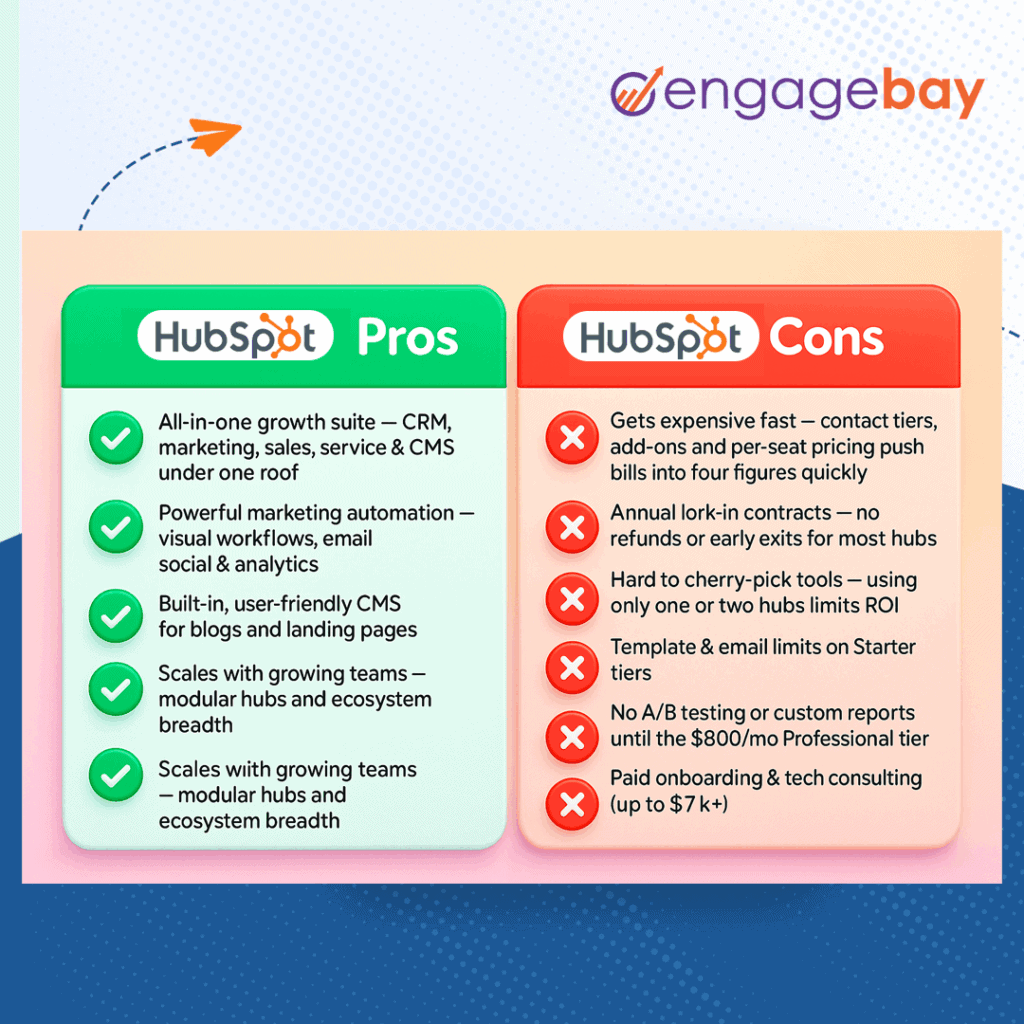
HubSpot Review: Pricing, Pros, Cons & Best-Fit Users - Limitations: Where HubSpot Gets Expensive and Complicated.
Pricing escalates aggressively
This is the most consistent criticism. Marketing Hub Professional starts at $890/month with a mandatory $3,000 onboarding fee and a 12-month commitment. Enterprise starts at $3,600/month with a $7,000 onboarding fee.
The headline price undersells what most teams actually pay. Three multipliers stack on top:
- Core Seats — per editing user.
- Marketing contact tier overages — billed in 1,000-contact increments, roughly $50/month per increment on Starter and Pro.
- Add-ons — dedicated IP, transactional email, Breeze credits, and other modules.
A mid-market team with 10,000 contacts and 5 seats should realistically budget around $2,280/month on Professional. At 25,000 contacts and 10 seats, that climbs to $3,000–$3,500/month.
Marketing contacts vs. CRM contacts
Only contacts you actively market to count toward your tier. Unlimited non-marketing contacts can sit in the free Smart CRM at no charge. This is a useful distinction, but it also means list growth needs to be planned carefully — going one contact over auto-bumps your tier with no soft cap.
Automation depth has limits
HubSpot's workflow builder is easier to learn than most enterprise alternatives, with multi-branch logic, condition gates, A/B branches, and webhook actions. But it lacks the ability to split-test entire automation paths — comparing a 5-email sequence against a 10-email sequence inside one workflow. Predictive sending is Pro+, and predictive lead scoring is Enterprise-only.
Customer service complaints
Review aggregators like Trustpilot show a pattern of negative feedback around customer service, with reviewers describing support interactions as frustrating. This is worth weighing if you expect hands-on help during onboarding or troubleshooting.
The onboarding fee is mandatory and non-refundable
Professional onboarding is $3,000; Enterprise is $7,000. It is non-refundable whether you complete the program or not. For smaller teams, this is often the deal-breaker.
Setup: What to Expect
Setup is now heavily AI-managed. HubSpot's onboarding assistant extracts information about your company — industry, role, team size, website domain, existing tooling — and pre-populates the account before you see the first dashboard.
According to Venture Harbour's eight-year review, a new free Smart CRM account can be up and running in about three minutes. No credit card, no manual property setup, no template-picking. The assistant configures sensible defaults, and you refine later.
That said, "easy to start" is not the same as "easy to scale." Once you move to Professional or Enterprise, the mandatory onboarding program becomes part of the process — and the complexity of your workflows, integrations, and reporting will determine how much of that program you actually need.
Pricing Signals: What You Will Realistically Pay
| Team profile | Likely tier | Realistic monthly cost |
|---|---|---|
| Solo founder, 1K contacts, 1 seat | Starter | ~$15/mo |
| Small team, 5K contacts, 3 seats | Starter | ~$245/mo |
| Mid-market, 10K contacts, 5 seats | Professional | ~$2,280/mo |
| Mid-market, 25K contacts, 10 seats | Professional | ~$3,000–3,500/mo |
| Enterprise, 50K contacts, 20 seats | Enterprise | ~$5,000–5,500/mo |
| Enterprise, 100K contacts | Enterprise | ~$5,850/mo + $7,000 onboarding |
Annual billing typically saves 10–15% versus monthly. Annual commitment is the default on Professional and Enterprise — mid-year cancellation does not stop billing.
Decision Criteria: Should You Choose HubSpot?
Ask yourself these questions before committing:
- Do you need closed-loop revenue attribution? If yes, HubSpot is one of the strongest options available. If no, you may be overpaying.
- Will you use at least three Hubs? If you only need email marketing or only need a CRM, a point solution will likely be cheaper and simpler.
- Can you absorb a $3,000–$7,000 onboarding fee? If not, the Professional and Enterprise tiers are effectively out of reach.
- Do you have someone who will own the platform? HubSpot rewards teams that invest in configuration, reporting, and workflow design. Without that owner, you will pay for features you never touch.
- Is your contact list growing predictably? Because marketing contacts are billed in 1,000-contact increments with no soft cap, unpredictable list growth can cause budget surprises.
If you are evaluating HubSpot primarily for messaging or integration capabilities, it is worth comparing it against dedicated messaging APIs. For example, our UnifyPort vs MessengerPeople.dev comparison looks at channels, pricing, and webhooks for teams that need multi-channel messaging infrastructure rather than a full CRM. Similarly, if your team needs calendar sync or scheduling as part of your customer platform, our Calendar API guide covers providers, features, and integration patterns.
Related reading
- UnifyPort vs MessengerPeople.dev vs Unipile: API Comparison - Compare UnifyPort, MessengerPeople.dev, and Unipile unified messaging APIs across channels, pricing, webhooks, and developer experience to pick the right fit.
- MessengerPeople.dev Review: Unified Messaging API Tested - An evidence-based MessengerPeople.dev review covering its unified messaging API, per-message and MAU pricing, WhatsApp setup, strengths, limits, and best-fit users.
- Group Chat Apps & APIs: The Complete Developer Guide - Compare top group chat apps like Discord and GroupMe, then learn how to build multi-channel group messaging with unified APIs, webhooks, and scalable infrastructure.
Sources and further reading
- Is Hubspot good as a CRM? - Reddit - Jul 1, 2021 ... Hubspot is a great CRM, it combines sales, marketing and teams into a centralized place and organises things for us that were once all over the ...
FAQ
Is HubSpot good for small businesses?
It depends on the small business. The free Smart CRM is genuinely useful for very small teams. But the jump to Marketing Hub Professional — $890/month plus a $3,000 onboarding fee — is a hard sell for most small businesses. If you need basic automation and email marketing, a lower-cost tool like ActiveCampaign may deliver roughly 90% of the value at a fraction of the price. If you need a CRM specifically, HubSpot's free tier is one of the best available.
How much does HubSpot cost in 2026?
Marketing Hub starts at $15/seat/month for Starter, $890/month for Professional, and $3,600/month for Enterprise. But realistic costs are higher due to contact tier overages, additional seats, and add-ons. A mid-market team with 10,000 contacts and 5 seats should budget around $2,280/month on Professional.
What is HubSpot's biggest weakness?
Pricing escalation. The platform is excellent, but the cost structure — mandatory onboarding fees, contact tier overages, annual commitments, and per-seat pricing — makes it difficult to justify for smaller teams or companies that will not use the full platform.
Is HubSpot's marketing automation good?
Yes, for most B2B teams. The workflow builder is well-designed and easier to learn than most enterprise alternatives. It supports multi-branch logic, condition gates, A/B branches, and webhook actions. However, it lacks split-testing for entire automation paths, and predictive features are locked behind higher tiers.
Does HubSpot have a free plan?
Yes. The free Smart CRM includes unlimited users, unlimited contacts, deal tracking, pipeline management, and 2,000 marketing emails per month. No credit card is required to start.
How long does HubSpot setup take?
A free Smart CRM account can be set up in about three minutes using HubSpot's AI onboarding assistant. Paid tiers involve a mandatory onboarding program, which adds time and cost.
Conclusion
HubSpot is a powerful, polished, and genuinely all-in-one customer platform. For B2B companies with complex sales cycles, agencies that need revenue attribution, and teams that will use multiple Hubs, it can be the best choice available. The reporting layer, the free CRM, and the integration ecosystem are real advantages.
But it is not cheap, and it is not for everyone. The pricing escalates aggressively past the free tier, the onboarding fees are mandatory and non-refundable, and the automation depth has limits that cheaper competitors sometimes exceed. If you are a small business, a solo founder, or a team that only needs one piece of the puzzle, you should evaluate alternatives carefully before committing to an annual contract.
The right question is not "Is HubSpot good?" It is "Will my team use enough of HubSpot to justify what it costs?" If the answer is yes, it earns its bill. If the answer is uncertain, start with the free tier and test that assumption before you sign.