
UnifyPort Documentation: API Reference, Webhooks & SDKs
A practical guide to UnifyPort documentation: REST API endpoints, webhook events, SDKs for Node.js, PHP, Go and Python, auth, and account lifecycle.
UnifyPort Documentation: A Practical Guide to the API, Webhooks, and SDKs
UnifyPort documentation is the entry point for developers who want to send and receive messages across Telegram, WhatsApp, LINE, X (formerly Twitter), Zalo, and TikTok through one REST API. Instead of learning six provider-specific SDKs and event formats, you work with a single endpoint, a normalized webhook stream, and a small set of shared concepts: workspaces, accounts, runtimes, and webhook endpoints.
This guide walks through the core parts of the documentation, explains how the pieces fit together, and gives you a clear path from your first API call to a production-ready webhook setup.
What the UnifyPort Documentation Covers
The official documentation is organized around a compact developer workflow: verify your API key, connect accounts, send messages, and receive standard events. The API reference details the endpoints, payloads, and webhook events for each supported channel.
Key sections you will encounter include:
- Getting started: base URL, authentication, and the first API call
- Workspace: the isolation boundary for your API key
- Account: virtual devices per channel and their authorization flows
- Runtime: the live connection process behind each account
- Webhook: durable inbound event delivery and signature verification
- SDKs: official clients for Node.js, PHP, Go, and Python
If you are evaluating whether this fits your stack, the UnifyPort features overview explains the standard event layer, webhook control plane, retries, and rate limiting in more detail.
Base URL and Authentication
UnifyPort Documentation: API Reference, Webhooks & SDKs - Base URL and Authentication.
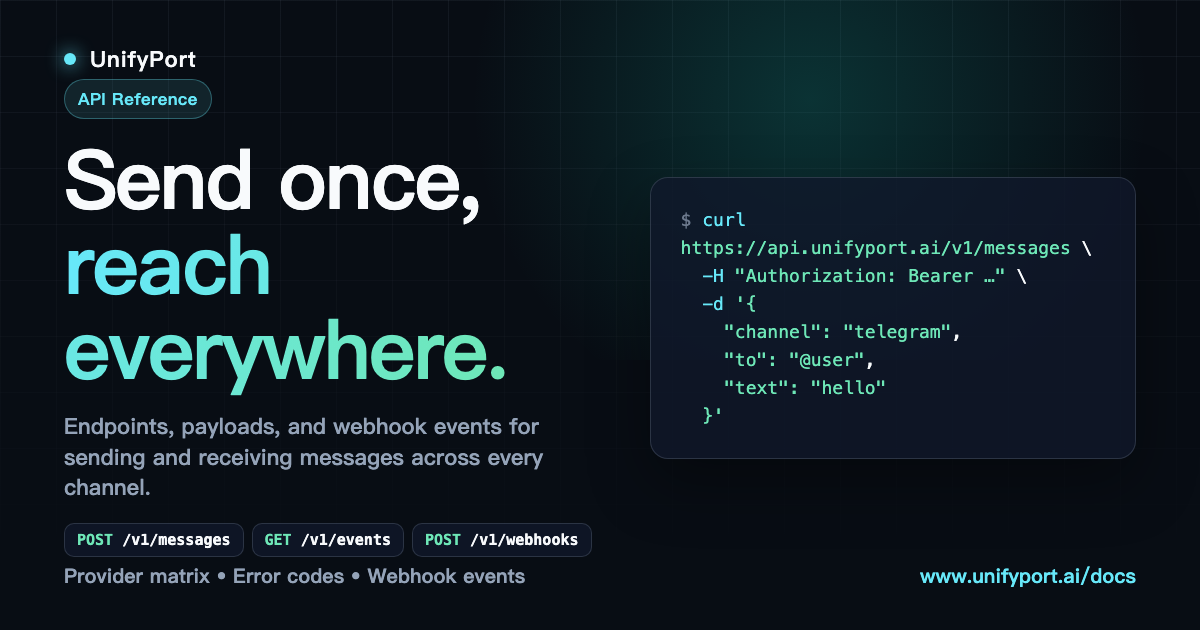
Every API request starts with the base URL:
https://api.unifyport.ai
All /v1 endpoints authenticate with the X-Api-Key request header. The key resolves to exactly one workspace and grants full access to it. You do not need to pass a separate workspace ID in request bodies.
A quick way to verify your key is to call the workspace endpoint:
curl https://api.unifyport.ai/v1/workspace \
  -H "X-Api-Key: <YOUR_API_KEY>"
Request IDs and Error Handling
JSON success and error responses carry a top-level request_id. For requests with no response body, such as successful 204 deletes, the ID is exposed through the X-Request-Id response header. Quote that value when reporting issues.
You can also send your own X-Request-Id request header. It is echoed as client_request_id in JSON responses, which helps with client-side reconciliation.
Core Concepts in the Documentation
UnifyPort Documentation: API Reference, Webhooks & SDKs - Core Concepts in the Documentation.
Workspace
A workspace is your isolation boundary. One API key maps to one workspace, and every account, webhook endpoint, and message you send lives inside that workspace. This keeps production, staging, and client environments separate without extra routing logic in your code.
Account
One channel login equals one virtual device, called an account. You create an account through the API, authorize it using the flow the provider supports—QR code, login code, or session import—and then send and receive messages through it.
Runtime
The runtime is the live connection process behind each account. It starts automatically after authorization succeeds, and its state is exposed as runtime_status. The account lifecycle documentation describes the full state machine, including connecting, connected, disconnected, and error states.
Webhook
UnifyPort has no REST message-history read API and no guaranteed replay. Your webhook is the durable record of inbound traffic. Register a webhook endpoint first and store what you need on arrival.
WhatsApp can emit limited best-effort HistorySync events after bootstrap or reconnect, but those are not a complete archive. Treat your own webhook storage as the source of truth for message history.
Sending Messages Through the Unified API
UnifyPort Documentation: API Reference, Webhooks & SDKs - Sending Messages Through the Unified API.
Sending a message uses a single endpoint regardless of the destination channel:
POST /v1/messages
The same endpoint handles text, images, files, and operational notifications. The account you target determines the channel, so your application code does not need provider-specific branches for outbound delivery.
A typical send flow looks like this:
- Create an account for the channel you want to use
- Authorize the account with the provider's flow
- Wait for the runtime to reach a connected state
- Send a
POST /v1/messagesrequest with the account ID and message payload - Monitor the response and any status events delivered to your webhook
Receiving Standard Events
Inbound messages, status updates, and account events all arrive at your webhook as standard events. UnifyPort converts every provider message into one consistent JSON shape, so your backend consumes a single event format across all channels.
A webhook endpoint is managed through the API. The documentation covers:
- Creating and activating endpoints
- Deactivating endpoints when you rotate infrastructure
- Signature verification with HMAC-SHA256
- Subscription management
- Retry behavior and failure tracking
Webhook Endpoint Lifecycle
The Python SDK exposes operations such as deactivate_webhook_endpoint, which maps to:
POST /v1/webhook-endpoints/{endpoint_id}/deactivate
This operation is non-retryable and non-destructive, meaning it only changes the active state of the endpoint rather than deleting it permanently. The endpoint_id is a required path parameter, and the optional X-Request-Id header is supported for client-side tracking.
Authentication for webhook operations works the same way as the rest of the API: X-Api-Key comes from the client configuration, not from operation inputs.
Official SDKs
UnifyPort provides official SDKs for four languages:
- Node.js
- PHP
- Go
- Python
The SDKs wrap the REST API and expose explicit methods for each operation. For example, the Python SDK provides deactivate_webhook_endpoint as a direct method for the corresponding HTTP operation. This keeps your integration typed and discoverable without manually constructing HTTP requests.
The SDKs follow the same authentication model: the API key is configured once on the client, and individual operations do not accept it as a parameter.
Recommended Developer Workflow
The documentation is designed around a flow short enough to remember:
- Connect accounts: attach Telegram accounts, WhatsApp instances, and other provider accounts to the same workspace
- Send messages: use the unified
/v1/messagesendpoint for text, images, files, and operational notifications - Receive events: route inbound messages and account status changes back to your webhook as standard events
Before you build on top of UnifyPort, it helps to understand the messaging landscape you are unifying. The instant messaging overview explains how IM platforms work and why a unified API strategy reduces integration overhead.
Webhook Reliability and Production Defaults
UnifyPort positions itself as production infrastructure rather than a simple channel aggregator. The documentation reflects that in several areas:
- Retry queue: webhook deliveries are retried with configurable behavior
- Signature verification: HMAC-SHA256 signatures let you validate that events came from UnifyPort
- Adaptive rate limits: built-in rate limiting reduces the impact of provider turbulence
- Failure isolation: issues with one channel do not take down the entire pipeline
These defaults matter when you are building notification systems, AI agents, CRMs, or operations tools that depend on reliable multi-channel messaging.
Where to Start
If you are new to UnifyPort, follow this sequence:
- Read the getting started section and verify your API key
- Register a webhook endpoint before sending any messages
- Create and authorize your first account
- Send a test message through
/v1/messages - Confirm the standard event arrives at your webhook
- Add signature verification and retry handling
- Move to the SDK for your language and build the integration into your application
For channel-specific context, the LINE features guide covers what the LINE platform offers and how a unified API simplifies integration for that channel specifically.
Related reading
- Line Dancing: A Beginner's Guide to Steps, Songs & Styles - Learn what line dancing is, its history, popular dances like the Electric Slide and Macarena, basic steps, wall counts, and how to start dancing today.
Sources and further reading
- API Reference — UnifyPort - Endpoints, payloads, and webhook events for sending and receiving messages across WhatsApp, Telegram, LINE, TikTok, Zalo, and X through one unified API.
- UnifyPort — One API. Every Channel. - Connect WhatsApp, Telegram, LINE, TikTok, Zalo, and X through one API for messages and events, without rebuilding the integration for every platform.
- UnifyPort-SDK-Python/docs/zh-CN/api-reference/deactivate-webhook-endpoint.md at main · Unify-Port/UnifyPort-SDK-Python - UnifyPort-SDK-Python. Contribute to Unify-Port/UnifyPort-SDK-Python development by creating an account on GitHub.
Frequently Asked Questions
What is the base URL for the UnifyPort API?
The base URL is https://api.unifyport.ai. All /v1 endpoints are relative to this base and authenticate with the X-Api-Key header.
Does UnifyPort have a REST API for reading message history?
No. UnifyPort does not provide a REST message-history read API or guaranteed replay. You should register a webhook endpoint first and store inbound events in your own system. WhatsApp may emit limited best-effort HistorySync events, but they are not a complete archive.
Which SDKs are officially supported?
Official SDKs are available for Node.js, PHP, Go, and Python. Each SDK wraps the REST API and exposes explicit methods for the available operations.
How does authentication work?
Every request authenticates with the X-Api-Key header. The key resolves to exactly one workspace and grants full access to it. No separate workspace ID is required in request bodies.
What is the difference between an account and a runtime?
An account is one channel login represented as a virtual device. The runtime is the live connection process behind that account. It starts automatically after authorization and exposes its state as runtime_status.
How do webhook signatures work?
UnifyPort signs webhook events with HMAC-SHA256 signatures. You can verify these signatures on your endpoint to confirm that events originated from UnifyPort and were not tampered with in transit.
What happens if a webhook delivery fails?
UnifyPort includes a retry queue with configurable retry behavior. The webhook control plane lets you manage signatures, subscriptions, retry behavior, and failure tracking so callbacks are observable from day one.
Conclusion
UnifyPort documentation is built around a small set of concepts that map directly to real integration work: workspaces for isolation, accounts for channel connections, runtimes for live state, and webhooks for durable inbound events. Once you understand those four pieces, the rest of the API falls into place.
The fastest path to a working integration is to verify your API key, register a webhook endpoint, authorize an account, and send your first message through /v1/messages. From there, the official SDKs and the standard event layer let you scale across Telegram, WhatsApp, LINE, X, Zalo, and TikTok without rebuilding the integration for every platform.