
CRM Messaging Integration: Connect SMS, WhatsApp & Chat to Your CRM
Learn how CRM messaging integration works, compare native texting vs. API vs. middleware, and build a multi-channel messaging stack that syncs with your CRM.
CRM Messaging Integration: How to Connect SMS, WhatsApp, and Chat to Your CRM
Customer conversations are scattered. Sales sends a WhatsApp follow-up from a personal phone. Support replies to an SMS thread that no one else can see. Marketing blasts an email campaign while the CRM record stays untouched. CRM messaging integration exists to fix exactly that: it connects your messaging channels to your customer relationship management system so every conversation is logged, triggered, and visible in one place.
This guide explains what CRM messaging integration actually means, the three main ways to build it, and how to choose an approach that scales beyond a single channel. Whether you run a sales team, a support desk, or an operations group, you will leave with a clear decision framework and practical setup steps.
What Is CRM Messaging Integration?
CRM Messaging Integration: Connect SMS, WhatsApp & Chat to Your CRM - What Is CRM Messaging Integration?.
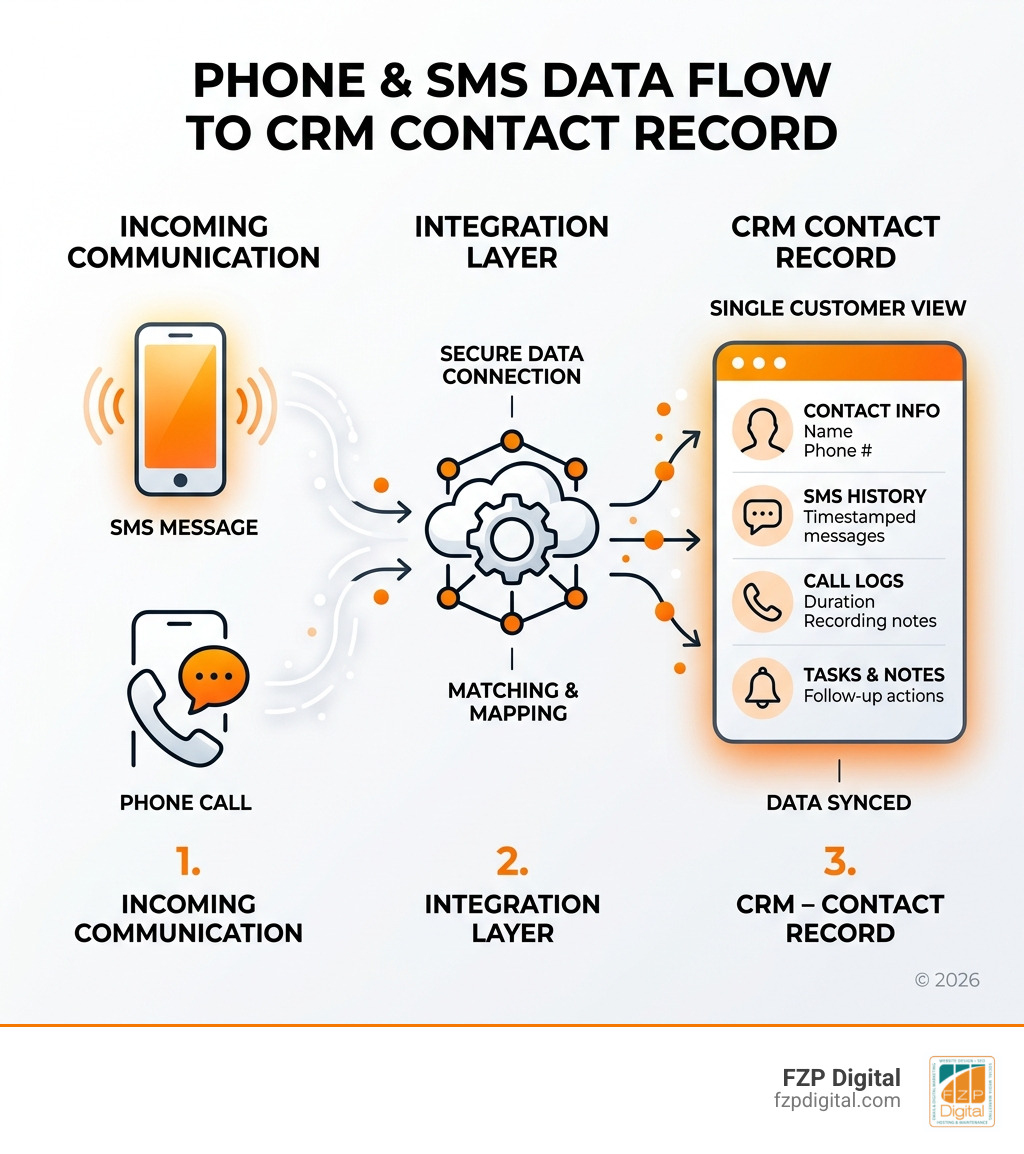
CRM messaging integration is the connection between a messaging platform and a CRM system so that contacts, triggers, and message logs sync automatically. Instead of copying phone numbers between tools or losing conversations in personal inboxes, your team sends and receives messages from a shared system that writes every interaction back to the customer record.
The core promise is simple: the CRM remains the system of record for customer data, while the messaging layer becomes the system of record for conversations. A well-built integration means a support agent can see that a customer received an appointment reminder, replied "Yes," and then opened a ticket, all on the same timeline.
Why CRM Messaging Integration Matters
CRM Messaging Integration: Connect SMS, WhatsApp & Chat to Your CRM - Why CRM Messaging Integration Matters.
Break Down Data Silos
Without integration, text messages live outside every system of record. If a team member is out sick or a personal phone breaks, no one else can access those conversations. Integration puts every message on the contact record alongside email history, call notes, and deal stage. That visibility reduces phone tag and prevents dropped follow-ups.
Unlock Trigger-Based Automation
Your CRM already holds purchase history, service tickets, important dates, and customer preferences. When messaging is connected, those data points can trigger texts automatically. A new lead enters the system and a welcome message fires. An opportunity moves to a new stage and a follow-up text goes out two days later. A support case closes and a satisfaction survey lands in the customer's preferred channel.
Personalize at Scale
Integrated messaging lets you use CRM fields to personalize every message. Instead of "Dear Customer," your texts say "Hi Maria, thanks for your order last week, here's a 10% coupon for your next visit." That level of personalization is only possible when the messaging layer can read from the same data source your team already trusts.
Stay Compliant
Business texting carries real legal weight. The Telephone Consumer Protection Act (TCPA) imposes statutory damages of $500 per text, rising to $1,500 for willful violations. A proper integration enforces consent rules at the send path: messages only reach contacts with a recorded relationship, and opt-out lists are respected regardless of what a CRM field says.
The Three Main Integration Approaches

CRM Messaging Integration: Connect SMS, WhatsApp & Chat to Your CRM - The Three Main Integration Approaches.
1. Native CRM Texting
Many CRMs offer built-in SMS or WhatsApp features. This is the fastest path for a single user sending one-to-one messages or basic campaigns from inside the CRM interface.
The limitation is scale. Native texting usually supports one-way blasts or simple two-way threads, not a shared inbox that a 30-person dispatch team can work from simultaneously. It also locks you into whatever channels the CRM vendor chose to build. If your customers use LINE, Zalo, or TikTok messaging, native CRM texting will not reach them.
Native texting works best for a solo salesperson or marketer who needs occasional, low-volume outreach and does not require team-level conversation management.
2. Middleware Connectors
Tools like Zapier bridge the gap between a CRM and a messaging platform without custom code. A CRM trigger, such as a new lead or a status change, fires a workflow that calls the messaging API to send a text. Replies can be logged back to the CRM record with a second step.
Middleware is fast to set up and requires no engineering team. The trade-off is depth. Complex two-way conversations, custom compliance rules, and high-volume throughput often outgrow a Zapier bridge quickly. Middleware also adds a dependency: if the connector breaks, your messaging pipeline stops.
3. Direct API Integration
A direct API integration gives developers full control. The CRM calls a messaging API whenever specific events occur, and incoming messages arrive as webhook events that the CRM can process and store. This approach supports custom routing, multi-channel delivery, retries, and idempotency, capabilities that matter at production scale.
The cost is engineering time. You need developers to build and maintain the integration, handle authentication, manage webhook signatures, and monitor delivery. For teams that already run custom CRM workflows, that investment often pays off. For smaller teams, it can be overkill.
Native Texting vs. Dedicated Integration: A Comparison
CRM Messaging Integration: Connect SMS, WhatsApp & Chat to Your CRM - Native Texting vs. Dedicated Integration: A Comparison.
| Factor | Native CRM Texting | Middleware Connector | Direct API Integration |
|---|---|---|---|
| Setup time | Immediate | Hours to days | Weeks to months |
| Engineering required | None | Minimal | Significant |
| Shared team inbox | Rarely | Depends on tool | Fully customizable |
| Multi-channel support | Limited to CRM vendor | Depends on connector | Any channel via API |
| Compliance control | Vendor-defined | Partial | Full control |
| Scalability | Low | Medium | High |
| Ongoing maintenance | Vendor-managed | Connector-dependent | Your team |
The right choice depends on volume, team size, and channel requirements. A five-person sales team sending occasional follow-ups may be fine with native texting. A 50-person operations team managing inbound replies across WhatsApp, SMS, and LINE needs a dedicated integration with a shared inbox and webhook-driven logging.
How to Build a Multi-Channel CRM Messaging Integration
Most CRM messaging discussions focus on SMS. But customers increasingly expect you to reach them on the channels they already use: WhatsApp, Telegram, LINE, X (Twitter), Zalo, and TikTok. Building separate integrations for each channel multiplies engineering work and creates inconsistent data.
A unified messaging API solves this by normalizing every channel behind one interface. Instead of learning provider-specific SDKs for WhatsApp Business, Telegram Bot API, LINE Messaging API, and others, your CRM integration calls a single REST endpoint. Incoming messages from any channel arrive as standardized webhook events in a consistent JSON shape, which makes logging to the CRM straightforward.
UnifyPort is one example of this approach. It positions itself as "One Port, Every Channel" and provides a unified messaging API that supports Telegram, WhatsApp, LINE, X (Twitter), Zalo, and TikTok through a single REST API and standardized webhook events. For CRM teams, that means one integration effort instead of six, with built-in rate limiting, retries with idempotency, and failure isolation for reliable delivery.
A Practical Setup Example
Imagine a support team that wants to log every customer conversation in their CRM, regardless of channel. The integration flow looks like this:
- Send path: When a support agent replies to a ticket, the CRM calls the messaging API with the customer's channel identifier and message body. The API routes the message to the correct provider.
- Receive path: When the customer replies on WhatsApp or Telegram, the messaging platform converts the provider-specific payload into a normalized event and delivers it to a webhook endpoint.
- Logging path: The CRM receives the webhook, verifies the HMAC-SHA256 signature, and writes the message to the contact record with channel, timestamp, and conversation thread.
This pattern keeps the CRM as the single source of truth while the messaging layer handles provider complexity.
Key Features to Look For
Standardized Event Layer
Every messaging provider formats incoming messages differently. A good integration platform converts all provider messages into a consistent JSON shape before they reach your CRM. Without this, your developers write a separate parser for each channel, and your CRM ends up with inconsistent data.
Webhook Control Plane
Production messaging requires more than a webhook URL. You need signature verification, subscription management, and retry configuration. A webhook control plane lets you manage these settings centrally instead of scattering them across provider dashboards.
Rate Limiting and Retries
Messaging providers impose rate limits, and networks fail. Built-in rate limiting prevents your CRM from triggering sends faster than a provider accepts them. Retries with idempotency ensure a message is delivered exactly once, even if the first attempt times out.
Failure Isolation
If one channel goes down, your other channels should keep working. Failure isolation means a WhatsApp outage does not block Telegram or LINE messages. For CRM teams that depend on messaging for time-sensitive notifications, this is non-negotiable.
Secure Authentication
API keys and HMAC-SHA256 signatures protect your integration from spoofed webhooks and unauthorized sends. Any platform you choose should support both.
Common CRM Messaging Use Cases
Sales Follow-Up
Trigger a WhatsApp or SMS follow-up when a lead enters a specific pipeline stage. Log the reply to the deal record so the next salesperson has full context.
Appointment Reminders
Send automated reminders before scheduled meetings. Customers can reply to confirm or reschedule, and the reply lands on their contact record.
Support Notifications
Notify customers when a ticket is created, updated, or resolved. Allow replies that route back into the support queue with full conversation history.
Recruiting and Staffing
Send shift offers to candidates and let them reply directly. Every conversation stays visible to the whole recruiting team, not trapped on one recruiter's phone.
Field Operations
Coordinate drivers, technicians, and contractors through a shared messaging inbox connected to dispatch records. Inbound replies confirm loads, acknowledge schedule changes, and surface issues in real time.
How to Choose the Right Approach
Start with three questions:
How many people need to see and respond to messages? If the answer is more than one or two, native CRM texting will not be enough. You need a shared inbox or a custom integration that routes conversations to the right person.
Which channels do your customers actually use? If the answer includes anything beyond SMS and email, check whether your CRM or middleware tool supports those channels natively. Most do not, which pushes you toward a unified messaging API.
What is your volume and compliance exposure? High-volume sends, regulated industries, or international customers all increase the need for proper consent enforcement, rate limiting, and audit trails.
For teams that need multi-channel reach without building six separate integrations, a platform like UnifyPort offers a practical middle path. It provides official SDKs for Node.js, PHP, and Go, workspaces for isolation, and accounts that act as virtual devices per channel. That architecture maps cleanly onto CRM concepts: a workspace can represent a business unit, and each account can represent a customer-facing channel identity.
If you are evaluating broader unified messaging options, this Unipile overview compares another unified messaging API across supported channels, pricing, and setup. For teams specifically interested in LinkedIn messaging, the Unipile LinkedIn API guide explains what that platform can and cannot do and how UnifyPort compares as an alternative.
Related reading
- CM.com Integration: APIs, Plugins & Developer Setup Guide - Learn how CM.com integration works across SMS, WhatsApp, payments, and plugins. Compare API options, setup steps, and unified messaging alternatives.
- Social Communication: Skills, Examples & Why It Matters - Learn what social communication is, the core skills involved, real-world examples, common challenges, and practical ways to strengthen it in daily life.
- Unipile LinkedIn API: Integration Guide & Alternatives - Learn how Unipile's LinkedIn API works, what it can and cannot do, pricing, setup steps, compliance risks, and how UnifyPort compares as an alternative.
Sources and further reading
- CRM Messaging AI For Marketers, Sales, And Service Reps - CRM Messaging is an easy-to-use Text Messaging Platform that helps our customers send and receive SMS and WhatsApp texts to their customers from their CRM.
- SMS CRM integration: How to connect texting to your CRM - Learn how SMS CRM integration streamlines workflows and personalizes customer communication with HubSpot, Salesforce, and automation tools.
- CRM With SMS and Text Messaging: How to Choose - Native texting or a dedicated SMS integration? Compare CRM with SMS and text messaging options, then find the right fit for dispatch, ATS, and ERP teams.
Frequently Asked Questions
What is the difference between an SMS API and a CRM integration?
An SMS API is a raw programmatic endpoint a developer calls to send a text. A CRM integration is a pre-built or custom connection between a messaging platform and a CRM that handles authentication, contact sync, message logging, and compliance enforcement. The API path requires engineering time; the integration path aims to remove it.
Can I send WhatsApp messages from my CRM?
Yes, but the method depends on your CRM. Some CRMs offer native WhatsApp connectors. Others require middleware like Zapier or a direct integration with a messaging API. A unified messaging API lets you send WhatsApp and other channel messages through the same interface you use for SMS.
How do webhooks work in CRM messaging integration?
Webhooks are HTTP callbacks that deliver incoming messages to your CRM in real time. When a customer replies on any connected channel, the messaging platform sends a POST request to a URL you configure. Your CRM verifies the request signature, parses the normalized event, and stores the message on the correct contact record.
Do I need developer resources to integrate messaging with my CRM?
It depends on the approach. Native connectors and middleware tools require little to no code. A direct API integration requires developers, especially if you need custom routing, multi-channel support, or advanced compliance logic. Teams without developers should start with native options or middleware and graduate to an API when volume demands it.
What is a unified messaging API?
A unified messaging API is a single interface that abstracts multiple messaging providers. Instead of integrating separately with WhatsApp, Telegram, LINE, and other channels, you integrate once and send or receive messages across all of them through one REST API and one webhook format. This reduces engineering work and keeps CRM data consistent across channels.
Conclusion
CRM messaging integration is not a single product decision. It is an architecture choice about where conversations live, who can see them, and how they connect to customer data. Native texting works for small, single-channel teams. Middleware bridges gaps quickly. A direct API integration, especially one built on a unified messaging layer, scales across channels and teams without multiplying maintenance.
The best setup keeps your CRM as the system of record for customer data and gives your messaging layer the job it does best: reliable, compliant, multi-channel delivery. Start by mapping your team size, channel mix, and volume. Then choose the integration path that matches, and build from there.